SCIENCEGATE

  • Home
  • Products
  • Profile
  • About Us
    • Events
    • Career
  • Contacts
 

Contact Us (65) 6561 0488

 
  • Series
  • Features
  • Software
  • Availability
  • Supported Model
  • Downloads
  • Selection Guide
 

BLUE Support / Downloads


Online Tutorial

  • BLUE Open Studio Online Tutorial
 

Manual

  • BLUE Open Studio Manuals
 

Software

  • BLUE Open Studio Trial Version
  • BI Dashboard Template
  • OFS (OPC Factory Server)
 

Update Modules

  • System Update for BLUE Open Studio (after the software version is changed.)


  • Series
  • Features
  • Software
  • Availability
  • Supported Model
  • Downloads
  • Selection Guide
 

BLUE Open Studio Supported Models


BLUE Open Studio supports the following models.

  •  PS5000 Series

  •  SP5000 Series

  •  3rd-party PC


  • Series
  • Features
  • Software
  • Availability
  • Supported Model
  • Downloads
  • Selection Guide
 

BLUE Open Studio Database Availability/OPC Server Client Availability


Database Availability

Database interface can be configured easily via standard technologies.
 
Type of Database BLUE Open Studio
Microsoft SQL Server
Jet 4.0
Access DB Engine
Analysis Services 12.0
Analysis Services 9.0
Data Mining Services
Indexing Service
ODBC Drivers
OLAP Services 8.0
Oracle
Search
Simple Provider
MS Data Shape
Microsoft Directory Services
SQL Server Native Client 11.0
 

OPC Server Client Availability

BLUE Open Studio includes OPC server clients as standard features.
 
  BLUE Open Studio
Server/Client OPC UA  *
OPC DA 3.0 -
OPC DA 2.05
Server OPC HAD
Client OPC.net
OPC XML

* V8.1 SP2 or later


  • Series
  • Features
  • Software
  • Availability
  • Supported Model
  • Downloads
  • Selection Guide
 

BLUE Open Studio Software Licenses


License Lineup

License level can be selected to meet your needs.
 
Product Name No. of
Licenses
No. of
Tags
Model Media

BLUE Open Studio

for Supervision

Build time 1 License 64,000 PFXBOSBT64KDV80 DVD *1
PFXBOSBT64KLV80 Sticker
Runtime PFXBOSRT64KLV80

BLUE Open Studio for

Supervision for 3rd Party PC

PFXBOS3PRT64KLV80

Upgrade License from

Line Mnagement Plus to

Supervision

Build time PFXBOSUG64KBT
Runtime PFXBOSUG64KRT

Upgrade from Line Management

Plus to Supervision for

3rd Party PC

PFXBOS3PUG64KRT

BLUE Open Studio for

Line Management Plus

Build time 32,000 PFXBOSBT32KDV80 DVD *1
PFXBOSBT32KLV80 Sticker
Runtime PFXBOSRT32KLV80

BLUE Open Studio for

Supervision for 3rd Party PC

PFXBOS3PRT32KLV80

Upgrade License from Line

Management  to Line

Management Plus

Build time PFXBOSUG32KBT
Runtime PFXBOSUG32KRT

Upgrade from Line Management

to Line Management Plus

for 3rd Party PC

PFXBOS3PUG32KRT

BLUE Open Studio for

Line Management

Build time 4,000 PFXBOSBT4KDV80 DVD *1
PFXBOSBT4KLV80 Sticker
Runtime PFXBOSRT4KLV80

BLUE Open Studio for

Line Management for 3rd Party PC

PFXBOS3PRT4KLV80

Upgrade License from

Machine Control to Line Mnagement

Build time PFXBOSUG4KBT
Runtime PFXBOSUG4KRT

Upgrade from Machine Control to

Line Management for 3rd Party PC

PFXBOS3PUG4KRT

BLUE Open Studio for

Machine Control

Build time 1,500 PFXBOSBT1KDV80 DVD *1
PFXBOSBT1KLV80 Sticker
Runtime PFXBOSRT1KLV80

BLUE Open Studio for

Machine Control for 3rd Party PC

PFXBOS3PRT1KLV80
BLUE Open Studio USB Hard key - - PFXBOSUSBL USB

BLUE Open Studio Thin Client

License (For Secure Viewer and

Mobile Access)

PFXBOSTC Sticker

PanelBuilder Import Wizard 

License (PanelBuilder Import

Wizard, PanelMate Import Wizard

and FactoryTalk Import Wizard

are included)

PFXBOSTK

*1 V8.1 only. Contact us to download V8.0


Version up License

Product Name No. of
Licenses
No. of
Tags
Model Media

Version up license for

Supervision

Build time 1 License 64,000 PFXBOSVU64KBT Sticker
Run time PFXBOSVU64KRT

Version up license for

Line Management Plus

Build time 32,000 PFXBOSVU32KBT
Run time PFXBOSVU32KRT

Version up license for

Machine Control

Build time 4,000 PFXBOSVU4KBT
Run time PFXBOSVU4KRT

Version up license for

Machine Control

Build time 1,500 PFXBOSVU1KBT
Run time PFXBOSVU1KRT

Version up license for

Supervision 3rd Party PC

Run time - PFXBOS3PVU64KRT

Version up license for Line

Management Plus 3rd Party PC

- PFXBOS3PVU32KRT

Version up license for

Line Management 3rd Party PC

- PFXBOS3PVU4KRT

Version up license for

Machine Control 3rd Party PC

- PFXBOS3PVU1KRT


  • Series
  • Features
  • Software
  • Availability
  • Supported Model
  • Downloads
  • Selection Guide
 

BLUE Open Studio Features


Flexible software for your need

Basic Features

Scripting Animation Recipes Email (SMTP)
Security Database Multi-touch FTP
Symbols Events Reports Histrical Performance
Tags Database Graphic and Design Tools Scalable PDF Export
Troubleshooting Trends Schedular SSL Support for Emails
Gestures Multi-Language OPC DDE Client
Alarms ActiveX and .NET Intellectual Property Protection Custom Widgets
 

Connectivity


  • 250+ available communication drivers for PLCs and many other devices.
  • Native OPC interfaces such as OPC UA/DA
  • Active X and .Net controls
  • Support upper connectivity to DB through MQTT.
 

Database/OPC

Database
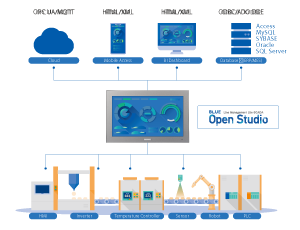
Connect to any SQL database (Microsoft SQL, MySQL, Sybase, Oracle), or Microsoft Access or Excel, and ERP/MES systems (including SAP), even from Windows Embedded Compact Edition. BLUE Open Studio is flexible, offering a built in interface that doesn’t require knowledge of SQL for trends, alarms/events, grid and other objects).


OPC
BLUE Open Studio provides native OPC interfaces, such as OPC DA (Server/Client), OPC HDA(Server), UA (Server/Client) and OPC .NET 3.0 (Client). BLUE Open Studio also supports OPC XML.


Trends

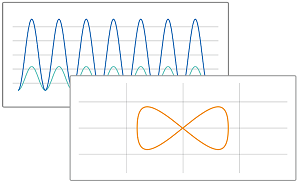
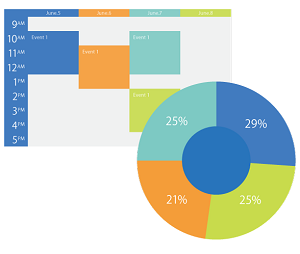
Real-time and Historical trends, and SPC functionality are supported. Log data in binary format, or to any local or remote SQL database. Color or fill trends with graphic elements to enhance clarity of data. Date/ Time based or numeric (X/Y plot) trends give you the flexibility to display information that best suits your application.
 

Custom Widget

Custom Widgets provides the ability to integrate third-party web-based controls into the HMI/SCADA project screens. Develop and share a library of controls that can be easily integrated into an application and accessible through multiple platforms.
 

FDA 21 CFR PART 11

Take advantage of built-in functionality to create 21 CFR part 11 compliant projects with traceability and e-signatures.
 

Remote Access

Access your BLUE Open Studio Screen from any device with a browser that supports HTML5, such as iPads, iPhones, Android devices, Windows devices, and others.
 
  • Studio Mobile Access 
    App store/Google play PC browser

  • Secure Viewer
    Dedicated application
 

Historian

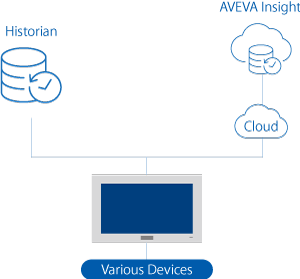
BLUE Open Studio includes support for saving historical data from some task worksheets to a Historian database or AVEVA Insight.


  1. Proface | BLUE Open Studio
  2. Proface | BLUE | Downloads
  3. Proface | BLUE | Supported Models
  4. Proface | BLUE | Operating Environment

Page 26 of 128

  • 21
  • 22
  • 23
  • 24
  • 25
  • 26
  • 27
  • 28
  • 29
  • 30

Brands

  • BeanAir
  • Control Techniques
  • Delphin
  • Exemys
  • Flowline
  • Futek
  • Hakko
  • Kansai
  • KARI
  • LCM System
  • Micro Epsilon
  • MIRUS
  • Pavone
  • Proface
  • Solartron Metrology
  • STS
  • VALCOM

About Us

  • Events
  • Career
  • Download
  • Contacts
bizSAFE3
PGO9
 

SCIGATE AUTOMATION (S) PTE LTD @ 2025. ALL RIGHTS RESERVED.