SCIENCEGATE

  • Home
  • Products
  • Profile
  • About Us
    • Events
    • Career
  • Contacts
 

Contact Us (65) 6561 0488


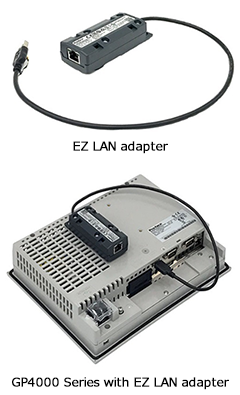
EZ LAN Adapter for simply networking the current machines/facilities, Dual IP would be standard in Pro-face HMI

IoT has been recently promoted in Automation, but they are facing a wide range of challenges. For example, when pushing forward networking of existing facilities, end user or machine builder need to adapt the changes to the facilities, and considering to add Ethernet switches for managing mass IP addresses. It requires time and cost, therefore, the networking often have been ended up giving up.

To solve such concerns, "EZ LAN adapter" that allows you to easily achieve networking by adding it will be released. This product is a USB-Ethernet converting adapter for GP4000 Series and allows you to easily add an additional Ethernet interface (RJ-45) to HMI. That promotes networking using the existing system and reduce workload for networking and managing IP address.

Since this is an optional product, end users just attach it to the existing GP4000 Series and equipment manufacturers can add it for only the customers who need it. It’s possible to easily start IoT.

Product Features

Divide Network Layer

  • Enable to divide IT network from Control network
  • Total two Ethernet interfaces on HMI (Two individual IP address)
  • Reduce workload for networking and managing IP address

Retrofit, Easily adapt existing machine/facility installed GP4000 Series

  • Thanks to the EZ Series concept (Optional USB connection), you can easily add Ethernet port

Configure by only HMI

  • No need to configure it by PC with software. It is easy for END user to add it.


  • Series
  • Operating Environment
  • Software
  • Downloads
 

Pro-face Connect Restrictions

Drivers that support ladder monitor tools and device/PLC communication

Drivers that have been evaluated to support the Pass-Through Function in the Pro-face Connect environment. This information is updated as other drivers are evaluated.
 

Drivers that can communicate with Pass-Through Function

Device/PLC Manufacturer Driver Name Series Name
Mitsubishi Electric Corporation Q Series CPU Direct MELSEC Q
QnA Series CPU Direct MELSEC QnA
QUTE Series CPU Direct MELSEC Q
FX Series CPU Direct MELSEC FX
Yaskawa Electric Corporation MP Series SIO (Extended) MP2000
MP Ethernet/Mechatrolink MP2000
Yokogawa Electric Corporation Personal Computer link SIO FA-M3
Personal Computer link Ethernet FA-M3
Omron Corporation CS/CJ Series HOST Link CJ1
CS/CJ Series Ethernet CJ1
Rockwell Automation, Inc. DF1 CompactLogix
Siemens AG SIMATIC S7 MPI Direct SIMATIC S7-300
KEYENCE Corporation KV-700/1000/3000/5000 CPU Direct KV-1000
Panasonic Industrial Devices SUNX Co., Ltd. FP Series Computer Link SIO FP
Shibaura Machine CO., LTD. TC Series (TCmini/TC200) TCmini

Drivers that can communicate with device/PLC set up as SiteManager Agents

This connection is possible when the license format is SiteManager Embedded Extended.

Device/PLC Manufacturer Driver Name Series Name
Mitsubishi Electric Corporation Q/QnA Series Ethernet MELSEC iQ-R
MELSEC iQ-F
MELSEC Q
Omron Corporation CS/CJ Series Ethernet CJ1
CJ2
KEYENCE Corporation KV-700/1000/3000/5000 Ethernet KV-5000
Siemens AG SIMATIC S7 Ethernet SIMATIC S7-200

Drivers that cannot communicate

Device/PLC Manufacturer Driver Name Series Name
Mitsubishi Electric Corporation Q Series QnU CPU Ethernet MELSEC Q

Actions you can use on Pro-Server EX

You can use the following actions only. *1
 
  • Upload to the database
  • Download from the database
  • Automatic Upload of Access Data
  • Automatic Download of Access Data
  • Writes Data to Excel Book
  • Download of Excel Recipe
  • Writes Data from CSV file
  • Writes Data to CSV file
  • Process-Data-Collection ACTION
  • Actual-Data-Collection ACTION
  • GP SRAM Alarm-History-File Collection ACTION
  • GP SRAM Sampling-Data Collection ACTION
  • ECreating a Report using Excel *2
  • Automatic Upload of GP Filing Data *2
  • Automatic Download of GP Filing Data *2
  • GP Log Data Upload *2
 

*1You cannot use actions where SiteManager or its agents are the trigger source (trigger conditions, entry nodes).

*2You cannot use data saved in external storage with this function. Save data to the display unit's internal memory.


  • Series
  • Operating Environment
  • Software
  • Downloads
 

Pro-face Connect Support / Download

Catalog

  • Product Guide


  • Series
  • Operating Environment
  • Software
  • Downloads
 

Pro-face Connect Related Software

 
Product Name Model No. Description
GP-Pro EX V*.* PFXEXEDV** HMI screen editor & logic programming software (DVD)
GP-Pro EX Editor License *1 PFXEXEDLS** GP-Pro EX editor license (license key code)
GP-Pro EX Group License *2 10 licenses PFXEXGRPLS**10 GP-Pro EX Editor Group License (license key code)
25 licenses PFXEXGRPLS**25
50 licenses PFXEXGRPLS**50
Pro-Server EX V*.* Developer *3 PFXEXSDVV** Software that connects a PC to a GP via Ethernet and collects and transmits data (DVD)
Pro-Server EX Developer License *4 EX-SED-LICENSE Pro-Server EX developer license (license key code)
Pro-Server EX Runtime License *5 EX-SRT-LICENSE Pro-Server EX Runtime License (license key code)
MES Action License EX-MES-LICENSE-V10 License key permitting Pro-Server EX to access a database (license key code)
GP-Viewer EX *6 Single license EX-VIEWER-LICENSE License allowing a PC to access a GP in remote mode (license key code)
10 licenses EX-VIEWER-LICENSE-10
30 licenses EX-VIEWER-LICENSE-30
Pro-face Remote HMI
(iPhone, iPad, iPod touch) V*.*
PFXEXRHIOSV** Software to operate Pro-face HMI screen on iPhone, iPad and iPod touch
Pro-face Remote HMI
(Android) V*.*
PFXEXRHANDV** Software to operate Pro-face HMI screen on Android OS
Pro-face Remote HMI Free
(Android) V*.*
PFXEXRHANDTRV** Free software to operate Pro-face HMI screen on tablets or smartphones with Android OS
Pro-face Remote HMI Client for Win Single license PFXEXRHCLS Software for remote viewing of Pro-face HMI from desktop PC (license key code)
10 licenses PFXEXRHCLS10
30 licenses PFXEXRHCLS30
Pro-face Remote HMI Server *6 Single license PFXEXRHSLS Software to operate Windows programs via the Pro-face Remote HMI APP on any Android or iOS device, single license (license key code)
Pro-face Connect PFXCONFREE30 Secure remote access to display or operate the screen of Pro-face HMI in remote locations on Windows PC or tablet.
Trial package running 30 days (license key code)

See the product page about the other licenses.

Video Converter License *6 EX-MOVCON-LICENSE License for the file conversion tool required to display video on the GP and PC (license key code)
Ladder Monitor License EX-LADM-MIT-Q02 License for add-on software that can be monitored by the Ladder Program of Mitsubishi's PLC Q Series (license key code)
EX-LADM-MIT-A01 License for add-on software that can be monitored by the Ladder Program of Mitsubishi's PLC A Series (license key code) (The ladder monitor is supported by the AnA series and the Q series (A mode).)
EX-LADM-OMR-CJ01 License for add-on software that can be monitored by the Ladder Program of OMRON's CS/CJ Series (license key code)
RPA Client License Single license EX-RPA License to access a PC on the network in remote mode (license key code)
10 licenses EX-RPA-10
30 licenses EX-RPA-30
WinGP for IPC *6 EX-WINGP-IPC Licence for using WinGP on WinGP-compatible IPC (license key code)
WinGP for PC/AT *6 EX-WINGP-PCAT Licence for using WinGP on PC/AT-compatible PC (license key code)
Camera-Viewer EX License *6 EXCAVELS Licence for using Camera-Viewer EX (license key code)
Camera-Viewer EX allows you to record ,play and check videos on PC at office in real time from cameras connected to GP.

*1Purchase this product when installing GP-Pro EX in a second or subsequent PC. One license is required for each PC.

*2Group License consists of one set of Serial No./Key Code for installation on 10/25/50 PCs. (Should be used in the same office. Supports GP-Pro EX Ver. 3.1 or later.)

*3Includes the settings editor and Runtime.

*4Purchase this product when installing the settings editor and Runtime in a second or subsequent PC.

*5Purchase this license when installing Runtime only in a second or subsequent PC. One license is required for each PC.

*6This application can be installed from GP-Pro EX DVD-ROM, only the license needs to be purchased.


  • Series
  • Operating Environment
  • Software
  • Downloads
 

Pro-face Connect Supported Models / Operating Environment

Supported Models

SP5000 Series

Module Type Supported Models
Open Box SP-5B40 (PFXSP5B40)
SP-5B41 (PFXSP5B41)
Power Box SP-5B10 (PFXSP5B10)
Standard Box SP-5B00 (PFXSP5B00)

SP5000X Series

Module Type Supported Models
Box SP-5B90 (PFXSP5B90)

GP4000 Series

Series Name Supported Models
GP4000 Series All models
* Except for GP4000M, GP-4201TW and GP4100 Series

IPC

Series Name Supported Models
PS5000 Series All models
* PS5001B module not supported under v.7 with Site Manager
PS-4600
PE4000B Series

Operating Environment

Gate Manager

Version 8.3.19081
Web Browsers Internet Explorer 9 or later, Google Chrome, Apple Safari, Mozilla Firefox )*1
URL URL available in the credentials email received from GateManager

*1The GateManager version 8.3.19081 may have some compatibility issues with the browsers Internet Explorer 11 (IE11) and Mozilla Firefox. These are experienced using the GateManager and LinkManager user interfaces. No compatibility issues have been found using Google Chrome or Microsoft Edge.

Link Manager

Version 8.3.0.18404
Personal computer model  Windows PC/AT compatible machine
Operating System
  • Windows Vista 32/64bit (All editions)
  • Windows 7 32/64bit (All editions)
  • Windows 8 32/64bit (All editions)
  • Windows 8.1 32/64bit (All editions)
  • Windows 10 32/64bit (Home/Pro/Enterprise editions)
Web Browsers Internet Explorer 9 or later, Google Chrome, Apple Safari, Mozilla Firefox
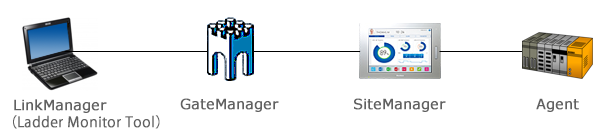
Network Settings The LinkManager is to be installed on the Windows OS computer (desktop, laptop, tablet) of the user.
Please refer to the Quick Start Guide, "Use Case Components" section

Site Manager

Versions
  • 8.3.0.18404-5 (SP5000 Open Box & PS5000 series Modular type Atom model, PS-5001B)
Operation System For information about the operating system installed on a display unit, refer to its corresponding hardware manual.

Restrictions

  • You cannot access to one SiteManager at the same time by using the same software from multiple LinkManagers (PC).
    Target softwares are as follows.
     ・GP-Pro EX (Pass-Through, Web Server)
     ・Pro-Server EX
     ・GP-Viewer EX
     ・Pro-face Remote HMI Client for Win

     
  • Pro-face Connect cannot communicate with Ethernet Multilink connections.
     
  • For drivers that support communication with ladder monitor tools and device/PLC, refer to the following.
    Drivers that support ladder monitor tools and device/PLC communication

     
  • For actions you can use on Pro-Server EX, refer to the following.
    Actions you can use on Pro-Server EX


  1. Proface | Remote HMI | PFXEXRHSLS
  2. Proface | Remote HMI | PFXEXRHANDTRV**
  3. Proface | Remote HMI | PFXEXRHANDV**
  4. Proface | Remote HMI | PFXEXRHIOSV**

Page 19 of 128

  • 14
  • 15
  • 16
  • 17
  • 18
  • 19
  • 20
  • 21
  • 22
  • 23

Brands

  • BeanAir
  • Control Techniques
  • Delphin
  • Exemys
  • Flowline
  • Futek
  • Hakko
  • Kansai
  • KARI
  • LCM System
  • Micro Epsilon
  • MIRUS
  • Pavone
  • Proface
  • Solartron Metrology
  • STS
  • VALCOM

About Us

  • Events
  • Career
  • Download
  • Contacts
bizSAFE3
PGO9
 

SCIGATE AUTOMATION (S) PTE LTD @ 2025. ALL RIGHTS RESERVED.