SCIENCEGATE

  • Home
  • Products
  • Profile
  • About Us
    • Events
    • Career
  • Contacts
 

Contact Us (65) 6561 0488

 
Download
Installation Guide
Conversion Adapter Installation Guide
   - GP3000H Conversion Adapter  (826 KB) 
   - Terminal Block Conversion Adapter  (216 KB) 
Cable-Related Installation Guide
   - USB Front Cable (CA5-USBEXT-01) Installation Guide  (73 KB) 
   - RS-232C/485 Isolation Unit  (3086 KB) 
   - USB-Serial (RS-232C) Conversion Cable Installation Guide  (103 KB) 
   - USB Data Transfer Cable  (117 KB) 
GP3000H dedicated cable
Included noise filter for (TDK PBW-1201-33) Installation Guide
   - GP3000H Direct-connect Cable Installation Guide  (763 KB) 
   - GP3000H Soft-type Cable for GP2000H Conversion Adapter (with connector) Installation Guide  (673 KB) 
Included noise filter for (TDK RSAL-2001W) Installation Guide
   - GP3000H Direct-connect Cable Installation Guide  (345 KB) 
   - GP3000H Soft-type Cable for GP2000H Conversion Adapter (with connector) Installation Guide  (345 KB)
PLC Ladder Monitor Operation Manual
   - OMRON Corporation CS/CJ Series PLC Ladder Monitor for GP-Pro EX  (999 KB) 
   - Mitsubishi Electric A Series PLC Ladder Monitor for GP-Pro EX  (1147 KB) 
   - Mitsubishi Electric Q Series PLC Ladder Monitor for GP-Pro EX  (1700 KB) 
CF Card Installation Guide
   - CF Card  (39 KB) 
Expansion Unit User Manual
   - VM Unit for GP3000 Series  (1109 KB) 
   - VM Unit  (1390 KB) 
   -  DVI Input Unit  (1405 KB) 
   - GP3000 Series RGB Input Unit Hardware Manual  (1191 KB) 
Network Unit Installation Guide
   - GP3000 Series CANopen Slave Unit  (976 KB) 
   - GP3000 Series PROFIBUS-DP Slave Unit  (1313 KB) 
   - GP3000 Series DeviceNet Slave Unit  (1441 KB) 
   - CC-Link Unit Intelligent Device Station  (962 KB) 
Protective Cover Installation Guide
   - 10.4inch/5.7inch (CA8-ODP10-01/CA4-DCMDL-01)  (70 KB) 
Screen Protection Sheet Attachement Instructions
   - GP-3700(CA3-DFS15-01)  (29 KB) 
   - GP-3600/GP-3500 (STH Model) (CA3-DFS12-01)  (27 KB) 
   - GP-3500 (TFT) (CA5-DFS10-01)  (26 KB) 
   - GP-3400(PS400-DF00)  (25 KB) 
   - GP-3300(CA3-DFS6-01)  (31 KB) 
   - GP-3200(CA6-DFS04-01)  (25 KB) 
   - GP-3000H(GP3000H-DFS6-01)  (81 KB) 
Function Expantion Memory Installation Guide
   - GP3000 Series Function Expantion Memory Installation Guide  (85 KB) 
Flex Network Installation Guide
   - Flex Network I/F Unit  (146 KB)
   - 8-point Input Sink/Source, 8-point Transistpr Output Sink Type  (177 KB)
   - 8-point Relay Output, 1 Common Type  (163 KB) 
   - 16-point Input Sink/Source Type  (171 KB) 
   - 16-point Input Sink/Source, 16-point Transistpr Output Sink Type  (282 KB) 
   - 16-point Input Sink/Source, 16-point Transistpr Output Source Type  (281 KB) 
   - 16-point Output Sink Type  (176 KB) 
   - 16-point Output Source Type  (177 KB) 
   - 32-point Input Sink/Source Type  (282 KB) 
   - 32-point Input Sink/Source, 32-point Transistpr Output Sink Type  (297 KB)
   - 2ch Analog /Digital Conversion Unit  (212 KB) 
   - 2ch Digital /Analog Conversion Unit  (361 KB) 
   - 4ch Analog /Digital Conversion Unit  (122 KB) 
   - 4ch Digital /Analog Conversion Unit  (128 KB) 
   - High Speed Counter Unit  (170 KB) 
   - Single-Axis Positioning Unit  (327 KB) 
   - Teaching Loader for Single-Axis Positioning Unit  (63 KB) 
Flex Network User Manual
   -   (3336 KB) 
   - 2ch Analog Unit  (1380 KB) 
   - Analog Unit  (1085 KB) 
   - High Speed Counter Unit  (1258 KB) 
   - Single-Axis Positioning Unit  (2213 KB) 
CANopen Slave I/O Unit
   - Hybrid Terminal Block Hardware Manual  (863 KB) 
   - Hybrid Terminal Block Installation Guide  (507 KB) 
Panel Cutout Adapter Installation Guide
   - Panel Cutout Adatper (CA4-ATM10-01) Installation Guide  (135 KB) 
   - GP-37W2B -> GP/ST/LT3300 Series  (75 KB) 
Wall Adaptor Attachment Installation Guide
   - GP3000H Wall Adaptor Attachment  (770 KB)
ABL-DRM03024 Installation Guide
   - ABL-DRM03024 Installation Guide  (102 KB) 


GP-Pro EX Ver. 4.0
■To download
   -  > Download all pages of Reference & Maintenance/Troubleshooting Manuals (HTML Help)   
      

GP-Pro EX Ver. 3.6
■To download
   -  > Download all pages of Reference & Maintenance/Troubleshooting Manuals (HTML Help)  
      

GP-Pro EX Ver. 3.5
■To download
   -  > Download all pages of Reference & Maintenance/Troubleshooting Manuals (HTML Help)  
      

GP-Pro EX Ver. 3.1
  ■To download
   -  > Download all pages of Reference & Maintenance/Troubleshooting Manuals (HTML Help)   
      

GP-Pro EX Ver. 3.0
■To download
   -  > Download all pages of Reference & Maintenance/Troubleshooting Manuals (HTML Help)   
      

GP-Pro EX Ver. 2.7
■To download
   -  > Download all pages of Reference & Maintenance/Troubleshooting Manuals (HTML Help)  
      

GP-Pro EX Ver. 2.6
 
  ■To download
   -  > Download all pages of Reference & Maintenance/Troubleshooting Manuals (HTML Help)   
      

GP-Pro EX Ver. 2.5
   -  > Download all pages of Reference Manual (PDF)  

GP-Pro EX Ver. 2.22
   -  > Download all pages of Reference Manual (PDF)  

GP-Pro EX Ver. 2.21
   -  > Download all pages of Reference Manual (PDF)   

GP-Pro EX Ver. 2.2
   -  > Download all pages of Reference Manual (PDF)   

GP-Pro EX Ver. 2.1
   -  > Download all pages of Reference Manual (PDF)   

GP-Pro EX Ver. 2.0
   -  > Download all pages of Reference Manual (PDF)   

GP-Pro EX Ver. 1.10
   -  > Download all pages of Reference Manual (PDF)   

GP-Pro EX Thai Manual Ver. 2.0
   -  > Download all pages of Reference Manual (PDF)  

GP-Pro EX Thai Manual Ver. 1.00.002
   -  > Download all pages of Reference Manual (PDF)   
Pro-Server EX Ver. 1.34
   -  > Download all pages of Reference Manual 
      After extracting the downloaded exe file, Please browse [SRPreface.htm] in the [ref] folder.

Pro-Server EX Ver. 1.33
   -  > Download all pages of Reference Manual 
      After extracting the downloaded exe file, Please browse [SRPreface.htm] in the [ref] folder.

Pro-Server EX Ver. 1.32
   -  > Download all pages of Reference Manual 
      After extracting the downloaded exe file, Please browse [SRPreface.htm] in the [ref] folder.

Pro-Server EX Ver. 1.31
   -  > Download all pages of Reference Manual 
      After extracting the downloaded exe file, Please browse [SRPreface.htm] in the [ref] folder.

Pro-Server EX Ver. 1.3
   -  > Download all pages of Reference Manual 
      After extracting the downloaded exe file, Please browse [SRPreface.htm] in the [ref] folder.

Pro-Server EX Ver. 1.24
   -  > Download all pages of Reference Manual 
      After extracting the downloaded exe file, Please browse [SRPreface.htm] in the [ref] folder.

Pro-Server EX Ver. 1.23
   -  > Download all pages of Reference Manual 
      After extracting the downloaded exe file, Please browse [SRPreface.htm] in the [ref] folder.

Pro-Server EX Ver. 1.22
   -  > Download all pages of Reference Manual 
      After extracting the downloaded exe file, Please browse [SRPreface.htm] in the [ref] folder.

Pro-Server EX Ver. 1.20
   -  > Download all pages of Reference Manual 
      After extracting the downloaded exe file, Please browse [SRPreface.htm] in the [ref] folder.

Pro-Server EX Ver. 1.10
   - Reference Manual   

Pro-Server EX Ver. 1.02
   - Reference Manual   

Pro-Server EX Ver. 1.00 - 1.01
   - Reference Manual   

Pro-Server EX related manuals
   - MES Action for Pro-Server EX Reference Manual  
   - OPC Server for Pro-Server EX Reference Manual  

Pro-Server with Pro-Studio Operation Manual
   - Factory Gateway Configuration Tool  
   - Pro-Server with Pro-Studio Ver. 4.5  
   - Pro-Server with Pro-Studio Ver. 4.1  
   - Pro-Server with Pro-Studio Ver. 4.0  
   - Pro-Server with Pro-Studio Ver.3.0  

GP-Web Operation Manual
   - Ver. 1.6  (2654 KB) 
   - Ver. 1.5  (2305 KB) 
   - Ver. 1.0  (712 KB) 

GP-Viewer Operation Manual
   - Ver. 1.1  (1363 KB) 

Pro-Designer
   - Startup Guide  (697 KB) 
   - Data-Sharing API User Manual  (186 KB) 
   - Data-Sharing API Driver User Manual  (146 KB) 
   - Pro-Server Communication Tool PD-Adapter Operation Manual  (209 KB)
   - Device Connection Manual   

PC Transfer Tool
   - Operation Manual  (451 KB) 


Download
Hardware Manual
   - GP3000 Series  (4424 KB) 
   - GP3000H Series  (2325 KB) 
Installation Guide
   - GP3300U Series  (853 KB) 
   - GP3000H Series  (1209 KB) 
   - GP3700/3600/3500 Series  (987 KB) 
   - GP3400/3300 Series  (1337 KB) 
   - GP3200 Series  (850 KB) 
   - GP3000 Series DIO Interface  (333 KB) 
   - GP3000 Series Flex Network Interface  (187 KB) 
   - GP3000 Series CANopen Interface  (286 KB) 
ATEX Instruction Guide
   - GP3000 Series  (159 KB) 
Others
   - ATEX (ATmosphere EXplosive) Directive Conformity Declaration  (106 KB) 
   - ATEX (ATmosphere EXplosive) Directive Instruction Sheet  (674 KB) 


Specification of AGP3300-U1-D24

GP-3300U
Model: AGP3300-U1-D24

Thumbnail
  • Serial x2
  • Ethernet
  • Video In
  • Video Unit
  • Fieldbus
  • I/O
  • USB
  • CF Card
S Class (Standard) /   TFT Color LCD (Ultra High-brightness)   (65,536 colors) /   QVGA
  • ManualProduct Image Data (BMP)Design Data (DXF)

Functional Specification

Display Type TFT Color LCD (Ultra luminance)
Display Size 5.7"
Resolution 320 X 240 pixels (QVGA)
Dot pitch W0.36 x H0.36 mm [W0.01 x H0.01 in.]
Effective Display Area W115.2 x H86.4 mm [W4.54 x H3.40 in.]
Display Colors 65,536 Colors (No blink)/16,384 Colors (Blink)
Backlight CCFL (User nonreplaceable parts. Factory replacement required.)
Brightness Control 8 Levels (Adjusted with the touch panel)
Contrast Control Not applicable
Language Fonts Japanese: 6,962 (JIS Standards 1 & 2) (including 607 non-kanji characters), ANK: 158 (Korean fonts, Simplified Chinese and Traditional Chinese fonts are downloadable.
Character Sizes Standard font: 8 x 8, 8 x 16, 16 x 16 and 32 x 32 pixel fonts, Stroke font: 6 to 127 pixel fonts, Image font: 8 to 72 pixel fonts
Font Sizes Standard font: Width can be expanded up to 8 times., Height can be expanded up to 8 times.*1
Text 8 x 8 dots 40 char. X 30 rows
8 x 16 dots 40 char. X 15 rows
16 x 16 dots 20 char. X 15 rows
32 x 32 dots 10 char. X 7 rows
Control Memory Variable Area SRAM 64 KB (uses lithium battery)*2
Program Area 132KB FLASH EPROM*3
Number of Step Equivalent to 15,000 steps*3
Application Memory FLASH EPROM 6MB*4
Data Backup SRAM 320KB (uses lithium battery)*2
Clock Accuracy ±65 sec/month (deviation at room temperature and power is OFF)*5
Touch Panel Type Resistive Film (analog)
Touch Panel Resolution 1,024 X 1,024
Touch Panel Service Life 1,000,000 times or more
Interface Serial (COM1) RS-232C/RS-422/RS-485, Asynchronous Transmission:, Data Length: 7 bit/8 bit, Parity: none, Odd or Even, Stop Bit: 1bit/2bit, Data Transmission Speed: 2,400bps to 115.2Kbps, Connector: DSUB9 (plug)
Serial (COM2) RS-422/485 Asynchronous Transmission, Data Length: 7 bit/8 bit, Parity: none, Odd or Even, Stop Bit: 1bit/2bit, Data Transmission Speed: 2,400bps to 115.2Kbps, 187.5Kbps(MPI), Connector: DSUB9 (socket)
Ethernet (LAN) IEEE802.3i/IEEE802.3u, 10BASE-T/100BASE-TX, Connector: Modular jack (RJ-45)×1
Expansion Unit 1 Communication Expansion Unit X 1
USB (TYPE-A) Conforms to USB1.1 (TYPE-A) x 1, Power Supply Voltage: DC 5 V ±5 %, Output Current: 500 mA or less, Communication Distance: 5 m or less
CF Card Compact Flash Card Slot (TYPE-II) x 1
  1. *1     Other font sizes can be set up with the Editor software.
  2. *2     A Lithium battery's lifetime is:
    10 years when the battery's ambient temperature is 40 oC or less.
    4.1 years when the battery's ambient temperature is 50 oC or less.
    1.5 years when the battery's ambient temperature is 60 oC or less.
    When used for back up: Approximately 100 days, with a fully charged battery.
    Approximately 6 days, with a half-charged battery.
  3. *3     Available only in units supporting logic programs
  4. *4     Capacity available for user.
  5. *5     Depending on the operating temperature and age of unit, the clock can deviate from -380 to +90 sec/month. For systems where this level of deviation is a problem, the user should monitor and make adjustments when required.
Page Top

General Specification

International Safety Standards
  • EU RoHS Directives
    Download
  •  
  • UL,cUL(508) Listed
    Download
  •  
  • CE
    Download
  •  
  • KC
     
  •  
  • Gost-R
     
Rated Input Voltage DC 24 V
Input Voltage Limits DC19.2 to 28.8V
Allowable Voltage Drop 5ms (max.)
Power Consumption 26W (max.)
In-Rush Current 30 A or less
Voltage Endurance AC1,000V 20mA for 1 minute, (between charging and FG terminals)
Insulation Resistance DC500V 10MΩ (min.), (between charging and FG terminals)
Surrounding Air Temperature 0 to 50 ℃
Storage Temperature -20 to +60℃
Ambient Humidity 10 to 90% RH (Wet bulb temperature: 39℃ max. - no condensation.)
Storage Humidity 10 to 90% RH (Wet bulb temperature: 39℃ max. - no condensation.)
Dust 0.1 mg/m³ or less (non-conductive levels)
Pollution Degree For use in Pollution Degree 2 environment
Atmosphere Free of corrosive gases
Air Pressure (altitude range) 800 to 1,114 hPa (2,000 m above sea level or less)
Vibration Resistance IEC/EN61131-2 compliant, 5 to 9 Hz Single amplitude 3.5 mm [0.14 in.], 9 to 150 Hz Fixed acceleration: 9.8 m/s², X, Y, Z directions for 10 cycles (100 min)
Concussion Resistance IEC/EN61131-2 compliant, 147 m/s², X, Y, Z directions for 3 times
Noise Immunity Noise Voltage: 1,000Vp-p, Pulse Duration: 1µs, Rise Time: 1ns, (via noise simulator)
Electrostatic Discharge Immunity Contact Discarge Method: 6kV (IEC/EN61000-4-2 Level 3)
Grounding Functional grounding: Grounding resistance of 100Ω, 2mm² or thicker wire, or your country's applicable standard. (Same for FG and SG terminals)
Structure IP65f NEMA #250 TYPE 1 (on the front panel when properly installed in an enclosure)*6
Installation Configuration Embedded panel
Cooling Method Natural air circulation
Weight Approx. 1.0kg [2.2lb] max. (unit only)
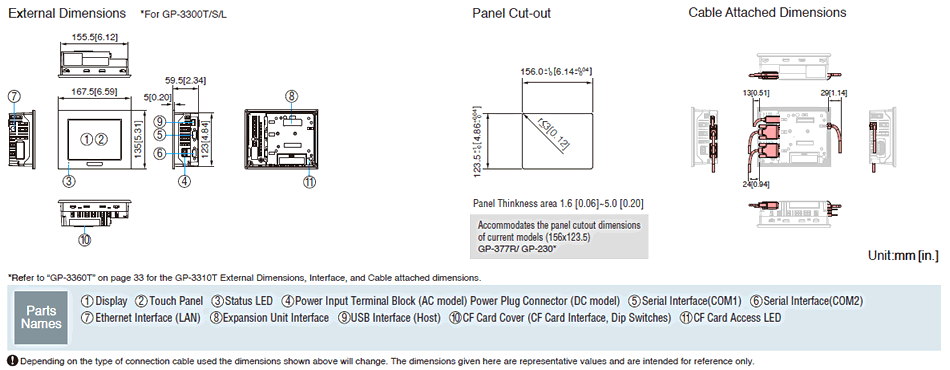
External Dimensions W167.5 X H135 X D59.5mm, [W6.59 X H5.31 X D2.34in.]
Panel Cut Dimensions W156 x H123.5 mm [W6.14 x H4.86 in.], Panel thickness area: 1.6 to 5 mm [0.06 to 0.2 in.]*7
  1. *6     The front face of the GP unit, installed in a solid panel, has been tested using conditions equivalent to the standards shown in the specification. Even though the GP unit's level of resistance is equivalent to these standards, oils that should have no effect on the GP can possibly harm the unit. This can occur in areas where either vaporized oils are present, or where low viscosity cutting oils are allowed to adhere to the unit for long periods of time. If the GP's front face protection sheet becomes peeled off, these conditions can lead to the ingress of oil into the GP and separate protection measures are suggested., Also, if non-approved oils are present, it may cause deformation or corrosion of the front panel's plastic cover. Therefore, prior to installing the GP be sure to confirm the type of conditions that will be present in the GP's operating environment., If the installation gasket is used for a long period of time, or if the unit and its gasket are removed from the panel, the original level of the protection cannot be guaranteed. To maintain the original protection level, be sure to replace the installation gasket regularly.
  2. *7     Regarding dimensional tolerance, everything +1/-0 mm [+0.04/-0 in.] and R in angle are below R3 [R0.12 in.].
Page Top

External Dimensions / Interfaces / Panel Cut-out / Cable Attached Dimensions

Decrease Reflectance
Page Top


  1. Proface|GP3000 Series|Specifications|AGP3600-U1-D24-CA1M
  2. Proface|GP3000 Series|Specifications|AGP3650-U1-D24
  3. Proface|GP3000 Series|Model
  4. Proface|GP3000 Series

Page 96 of 128

  • 91
  • 92
  • 93
  • 94
  • 95
  • 96
  • 97
  • 98
  • 99
  • 100

Brands

  • BeanAir
  • Control Techniques
  • Delphin
  • Exemys
  • Flowline
  • Futek
  • Hakko
  • Kansai
  • KARI
  • LCM System
  • Micro Epsilon
  • MIRUS
  • Pavone
  • Proface
  • Solartron Metrology
  • STS
  • VALCOM

About Us

  • Events
  • Career
  • Download
  • Contacts
bizSAFE3
PGO9
 

SCIGATE AUTOMATION (S) PTE LTD @ 2025. ALL RIGHTS RESERVED.