TFT Color LCD (65,536 colors) / Display Resolution: QVGA
Functional Specification
Display Type
TFT Color LCD
Display Size
3.5"
Resolution
320 x 240 pixels (QVGA)
Effective Display Area
W70.56 x H52.92 mm (W2.78 x H2.08 in.)
Display Colors
65,536 colors
Backlight
White LED (When replacement is required,contact your local GP distributor)
Brightness Control
16 Levels (Adjusted with the touch panel or the software)
Backlight Service Life
50,000 hrs. or more (continuous operation at 25°C (77°F) before backlight brightness decreases to 50%)
Language Fonts
Japanese: 6,962 (JIS Standards 1 & 2) (including 607 non-kanji characters) ANK: 158 (Korean, Traditional Chinese and Simplified Chinese fonts are downloadable.
Character Sizes
Standard font: 8 x 8, 8 x 16, 16 x 16 and 32 x 32 pixel fonts Stroke font: 6 to 127 pixel fonts Image font: 8 to 72 pixel fonts
Font Sizes
Standard font: Width can be expanded up to 8 times. Height can be expanded up to 8times.*1
RS-232C/422/485, Asynchronous Transmission, Data Length: 7 or 8 bit, Parity: none, Even or Odd, Stop Bit: 1 or 2 bit, Data Transmission Speed: 2,400 to 115,200bps, 187,500 bps, Connector: D-Sub9 (plug)
Ethernet (LAN)
IEEE802.3i/ IEEE802.3u, 10BASE-T/100BASE-TX Connector: Modular jack (RJ-45) x 1
USB (TYPE-A)
USB2.0, Connector:Type A x 1, Power Supply Voltage:DC5V±5%, Maximum Transmission Distance:3m (9.84 ft.) or less
USB (mini-B)
USB2.0, Connector:mini-B x 1, Power Supply Voltage:DC5V±5%, Maximum Transmission Distance:5m (16.40 ft.) or less
*1 Please refer to the GP-Pro EX Reference Manual for details on font types and character codes.
*2 Capacity available for user application. The capacity depends on how many fonts you load from Editor software.
*3 Application memory can provide 128KB for Data Backup.
*4 Set up the “Clock Updates“ feature with the Editor software. Please refer to the GP-Pro EX Reference Manual “Common” - “Clock Update Settings” for details.
General Specification
International Safety Standards
Rated Input Voltage
DC24V
Input Voltage Limits
DC20.4 to 28.8V
Allowable Voltage Drop
10ms or less
Power Consumption
6.5W or less
In-Rush Current
30A or less
Voltage Endurance
1,000 Vac 20 mA for 1 min (between charging and FG terminals)
Insulation Resistance
500 Vdc, 10 MΩ or more(between charging and FG terminals)
Surrounding Air Temperature
0 to 50 °C (32 to 122 °F)
Storage Temperature
-20 to 60 °C (-4 to 140 °F)
Ambient Humidity
85% RH (Wet bulb temperature: 39 °C (102.2 °F) or less - no condensation.)
Storage Humidity
85% RH (Wet bulb temperature: 39 °C (102.2 °F) or less - no condensation.)
Dust
0.1mg/m³(10-7 oz/ft³) or less (non-conductive levels)
Pollution Degree
For use in Pollution Degree 2 environment
Atmosphere
Free of corrosive gases
Air Pressure (altitude range)
800 to 1,114hPa (2,000 m (6,561 ft) or lower)
Vibration Resistance
IEC/EN61131-2 compliant, 5 to 9 Hz Single amplitude 3.5 mm [0.14 in.], 9 to 150 Hz Fixed acceleration: 9.8 m/s2, X, Y, Z directions for 10 cycles (100 min)
Functional grounding: Grounding resistance of 100Ω, 2mm² (AWG 14) or thicker wire, or your country's applicable standard.
Structure
NEMA#250 TYPE 4X (indoor, installed in an enclosure) Display module: IP 65f (IEC60529) Rear module: IP 20 (IEC 60529)
Cooling Method
Natural air circulation
Weight Approx.
0.36 kg (0.79 lb.) or less (main unit only)
External Dimensions / Interfaces / Panel Cut-out
Specification of GP-4301TM
GP-4301TM
Model: PFXGM4301TAD
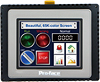
TFT Color LCD (65,536 colors) / Display Resolution: QVGA
Functional Specification
Display Type
TFT Color LCD
Display Size
5.7"
Resolution
320 x 240 pixels (QVGA)
Effective Display Area
W115.2 x H86.4 mm (W4.53 x H3.40 in.)
Display Colors
65,536 colors
Backlight
White LED (When replacement is required,contact your local GP distributor)
Brightness Control
16 Levels (Adjusted with the touch panel or the software)
Backlight Service Life
50,000 hrs. or more (continuous operation at 25°C (77°F) before backlight brightness decreases to 50%)
Language Fonts
Japanese: 6,962 (JIS Standards 1 & 2) (including 607 non-kanji characters) ANK: 158 (Korean, Traditional Chinese and Simplified Chinese fonts are downloadable.
Character Sizes
Standard font: 8 x 8, 8 x 16, 16 x 16 and 32 x 32 pixel fonts Stroke font: 6 to 127 pixel fonts Image font: 8 to 72 pixel fonts
Font Sizes
Standard font: Width can be expanded up to 8 times. Height can be expanded up to 8times.*1
RS-232C/422/485, Asynchronous Transmission, Data Length: 7 or 8 bit, Parity: none, Odd or Even, Stop Bit: 1 or 2 bit, Data Transmission Speed: 2,400 to 115,200bps, 187,500 bps, Connector: D-Sub9 (plug)
Ethernet (LAN)
IEEE802.3i/ IEEE802.3u, 10BASE-T/100BASE-TX Connector: Modular jack (RJ-45) x 1
USB (TYPE-A)
USB2.0, Connector:Type A x 1, Power Supply Voltage:DC5V±5%、Maximum Transmission Distance:3m (9.84 ft.) or less
USB (mini-B)
USB2.0, Connector:mini-B x 1, Power Supply Voltage:DC5V±5%、Maximum Transmission Distance:5m (16.40 ft.) or less
*1 Other font sizes can be set up with the Editor software.
*2 Capacity available for user application. The capacity depends on how many fonts you load from Editor software.
*3 Application memory can provide 128KB for Data Backup.
*4 Set up the “Clock Updates“ feature with the Editor software. Please refer to the GP-Pro EX Reference Manual “Common” - “Clock Update Settings” for details.
General Specification
International Safety Standards
Rated Input Voltage
DC24V
Input Voltage Limits
DC20.4 to 28.8V
Allowable Voltage Drop
7ms or less
Power Consumption
6.8W or less
In-Rush Current
30A or less
Voltage Endurance
1,000 Vac 20 mA for 1 min (between charging and FG terminals)
Insulation Resistance
500 Vdc, 10 MΩ or more(between charging and FG terminals)
Surrounding Air Temperature
0 to 50 °C (32 to 122 °F)
Storage Temperature
-20 to 60 °C (-4 to 140 °F)
Ambient Humidity
85% RH (Wet bulb temperature: 39 °C (102.2 °F) or less - no condensation.)
Storage Humidity
85% RH (Wet bulb temperature: 39 °C (102.2 °F) or less - no condensation.)
Dust
0.1 mg/m3 (10-7 oz/ft3) or less (non-conductive levels)
Pollution Degree
For use in Pollution Degree 2 environment
Atmosphere
Free of corrosive gases
Air Pressure (altitude range)
800 to 1,114 hPa (2,000 m (6,561 ft) or lower)
Vibration Resistance
IEC/EN61131-2 compliant, 5 to 9 Hz Single amplitude 3.5 mm [0.14 in.], 9 to 150 Hz Fixed acceleration: 9.8 m/s2, X, Y, Z directions for 10 cycles (100 min)
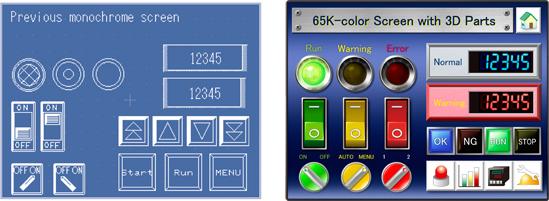
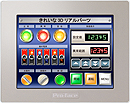
Realize expressive operation screens with 3D real parts in 65,536 colors.
*Use the project converter to distribute screens assets with GP-Pro EX.
Enhanced graphics for even the most basic functions
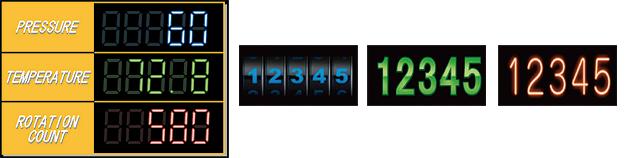
Utilize 65,536 colors for basic functions such as 7-digit display and color-swap for alarm status messages. A variety of graphical fonts provides easy-to-read numbers.
Easy to create
Easy to create
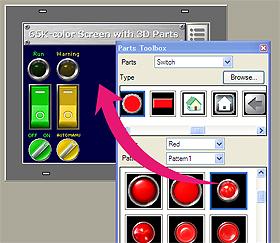
Drag-and-drop allows you to easily create operation screens on GP-Pro EX, a screen creation software.
In addition, it's easy to create attractive screens by downloading backgrounds and illustrations online.
Easy to install
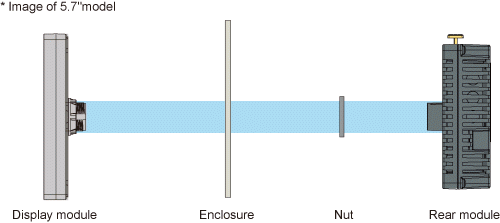
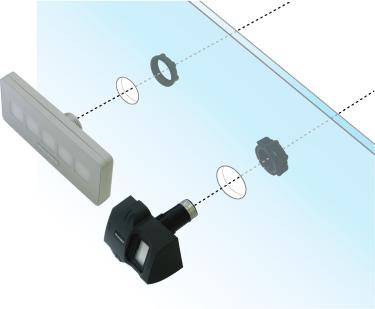
Just make a φ22 mm [0.87 in.] circular hole
Flexible installation choices for separated or integrated configurations
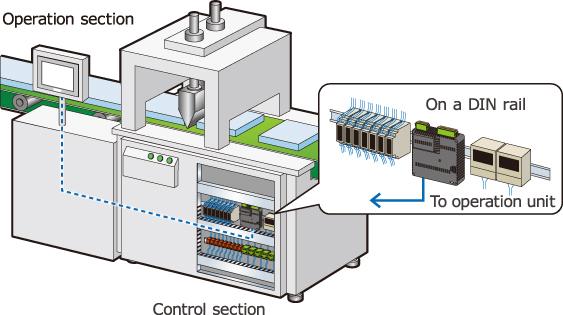
Use a separation cable* to install the control unit on a DIN rail and the operation unit in a different location. Operation unit is space-saving, and it allows you to install the unit flexibly even though it is difficult to install it due to limitations of space.
*Requires separate 3m or 5m option cable.
Easy to connect
Easy to connect
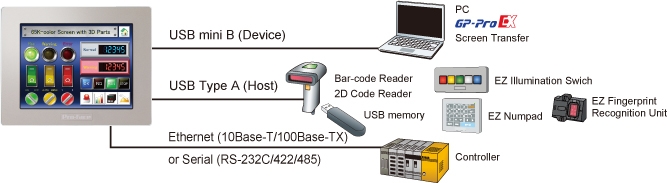
Provides a variety of onboard interfaces for hassle-free connection to various peripheral and control devices.
Connect to various control devices via Ethernet or a serial port.
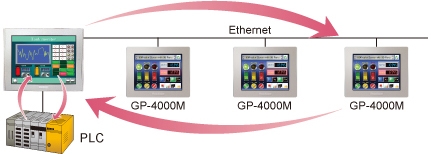
The Ethernet Multilink function allows you to add a GP as a sub-display on an Ethernet network without changing any machine settings. It could be replaced with Fieldbus networks, more open and reasonable network solution.
Configuring settings smoothly
Configuring settings smoothly
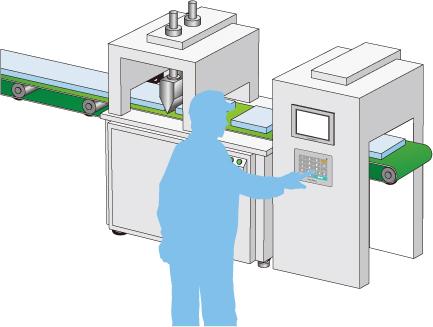
When settings need to be configured frequently, the increase in the number of cramped data entry screens to accommodate on-screen numeric keypads and the number of times the operator needs to switch between screens leads to reduced operability and misoperation. Using the EZ Numeric Keypad frees up screen real estate, leading to improved operability. This reduces the stress associated with frequent settings configuration.
Tactile feedback for trusty input operation.
Input numbers and letters even when wearing gloves.
Prevents deterioration of display caused by operation with dirty hands.
Easily connect multiple USB devices
Easily connect multiple USB devices
A controller with serial interface, EZ Series accessory unit, bar code reader, and USB flash drive can be easily connected to the HMI unit.
*1Make sure that the display module (Model No: PFXXM4300TP/PFXXM4200TP) is mounted when you transfer project files or while performing maintenance. It may not be possible to determine whether the setup has been completed properly.