SCIENCEGATE

  • Home
  • Products
  • Profile
  • About Us
    • Events
    • Career
  • Contacts
 

Contact Us (65) 6561 0488

 
Catalog thermoIMAGER TIM
 

Thermal imaging cameras for glass


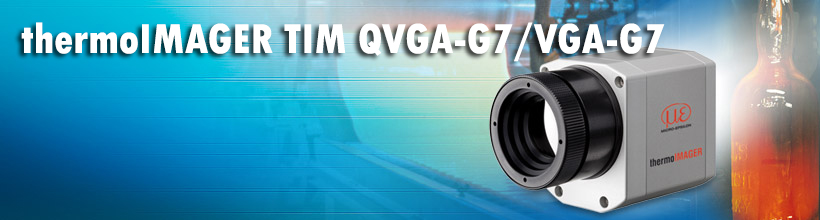
The thermoIMAGER TIM QVGA-G7 / VGA-G7 is an industrial thermal imaging camera specially designed for applications in the glass industry. The spectral range of 7.9 µm enables reliable measurements even on thin glass sheets. If the glass has a reflection coating, an additional reference pyrometer can be integrated in order to readjust the thermal imaging camera. Like all thermoIMAGER TIM cameras, the G7’s license-free analysis software includes a line scan feature that enables the monitoring of thermal processes, even if the field of vision is restricted.


 Characteristics

  •  Line scan feature via license-free analysis software
  •  Compact size of 46 x 56 x 68-77 mm
  •  Image frequency of 80 Hz
  •  Robust against ambient temperatures up to 70 °C without requiring additional cooling, up to 315 °C with cooling jacket
  •  Optional integration of a reference pyrometer for glass with a reflection coating
  •  NEW: TIM VGA G7 with up to 125 Hz measurement speed and VGA resolution of 640 x 480 pixels


DOWNLOADS

 Catalog thermoIMAGER TIM  
 Data sheet thermoIMAGER TIM 640

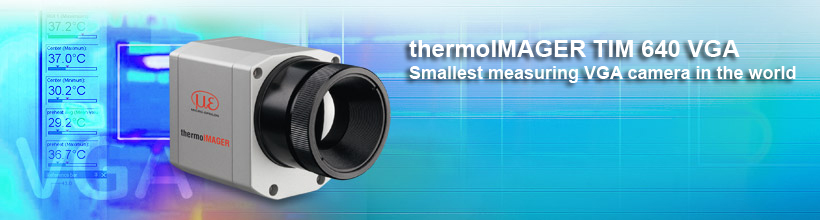
Smallest VGA infrared camera in the world – thermoIMAGER TIM 640 VGA


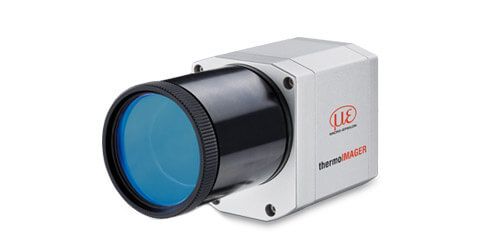
The thermoIMAGER TIM 640 infrared camera is the smallest VGA-resolution thermal imaging camera in the world, providing thermal images in real time due to its optical resolution of 640 x 480 pixels. With dimensions of 46x56x90mm and weighing just 320g (incl. optics), the thermoIMAGER TIM 640 is one of the most compact thermal imaging cameras on the market. The scope of supply includes the extensive TIM Connect analysis software.

Measuring ranges: -20 to 100°C / 0 to 250°C / 150 to 900°C
Optical resolution 640x480 pixels
Spectral range: 7.5 – 13 µm
Excellent thermal sensitivity (NETD): 75 mK
Lenses: 15°,33°, 60°,90° FOV
Image recording in real time at 32Hz
Supply and operation via USB
Extremely lightweight, robust and compact
Analog input and output, trigger interface
Protection class IP67


DOWNLOADS

 Catalog scanCONTROL 

Integration into application software


The scanCONTROL sensors record a profile from individual calibrated points for each measurement. These profiles can be used individually or combined in a container set, and transferred to your own applications as an array or matrix. In addition to the data transfer of individual measuring points and their additional information (e.g. intensity, counter reading) the entire configuration of the sensor can also be controlled from its own application software.

In order to access the functions for configuration and data transfer, Micro-Epsilon offers different tools:

 
scanCONTROL Developer Tool as integration example

The scanCONTROL Developer Tool is designed to help developers integrate the scanCONTROL sensors into their own application based on the scanCONTROL SDK (LLT.DLL):

  • Complete integration example with source code
  • MouseOver feature for the scanner parameters displays the associated DLL function
  • Read and write access to the sensor registers
  • Visualization of all available transmission modes for scanner data


Integration using the SDKs for C/C++ and C#

The C/C++ library for scanCONTROL supports both static and dynamic loading. Both stdcall and cdecl are supported as calling conventions. The individual functions of the library are clearly documented in the interface description and explained using examples.

The scanCONTROL SDK integration package includes:

  • LLT.DLL library file
  • Documentation for interfaces and scanCONTROL
  • Interface for C#, Python and VB .NET
  • Numerous programming examples for C++ and C# (e.g. trigger and container mode)


Integration in LabVIEW

The scanCONTROL instrument driver LabVIEW supports fast integration of scanCONTROL sensors into National Instruments LabVIEW. For accessing a scanCONTROL sensor and its basic settings, users can drag-and-drop modules directly from the function palette into their VIs. Example VIs illustrating the scanCONTROL integration are also part of this package.

The integration of scanCONTROL sensors into the LabVIEW environment is based on the C/C++ library (LLT.DLL) of Micro-Epsilon. Detailed documentation also shows how to set up additional special sensor parameters.

The scanCONTROL instrument driver for LabVIEW:

  • Developed according to the LabVIEW instrument driver guidelines by National Instruments
  • LabVIEW 2012 and higher supported
  • Comprises instrument drivers for 32Bit and 64Bit
  • Fast and easy access to all settings via function palette
  • Ethernet interface supported
  • Example VIs
  • Detailed documentation


DOWNLOADS

 Catalog scanCONTROL (PDF, 6.34 MB)    
 Manual "gapCONTROL setup software (PDF, 6.15 MB)

gapCONTROL Setup Software


Gap measurement and evaluation means to be a complex task. In detail, there are different definitions of how the optical gap is defined for different industries and measuring targets. The gapCONTROL Setup Software has been precisely adjusted to the requirements of the different gap measurements and it makes configuration of gapCONTROL sensors quick and easy. The gapCONTROL Setup Software, together with the gapCONTROL sensors, represents a complete solution for automated gap measurement. After parameterization, the sensor operates in standalone mode. However, the software can be used for the visualization of the measured values.

Setup gapCONTROL sensors

The gapCONTROL sensors offer different options and settings. All these settings can be accessed with theConfiguration Tools software. One possibility is accessing directly the image of the sensor matrix to set up the sensor optimum to the target. This view displays a live image of the matrix and helps to eliminate reflections on the target surface.


Display, save, load and exports profiles

ThegapCONTROL Setup Software allows both profiles and measuring results (e.g. gap width) to be saved. Stored profiles, even without a gapCONTROL sensor connected, can be re-loaded, and all parameters of the evaluation can be tested on this offline data. Several example profiles are already included with the standard installation of the gapCONTROL Setup Software, and they can largely be used to test the how the software works.

Gap modes

The user-friendly, intuitive software guides the user through the program. In the first step, a gap mode is chosen from a wide selection of gap types.

"Basic Gaps", "Projected Gaps" and „Groove Gaps“ require little or no settings."Advanced Gaps" provides the user with configurable advanced parameters, executing complex gap measurement tasks.


Setup and configuration of gap measurements

The next step is to specify the search algorithms for the right and left-hand edges. The simple "Basic Gaps", "Groove Gaps" and "Projected Gaps" already contain the correct algorithms.

In addition, the software allows the user to determine the algorithms for measuring the offset (flush) and the projection between both sides.Global sensor settings can also be made quickly. For dynamic processes, gapCONTROL also offers a tracking functionality, e.g. following the center position.

Measurement output


For output of measured values, these can be configured with freely assigned values. As well as measurement value output via Ethernet (Modbus TCP protocol, UDP) and RS422 (Modbus RTU protocol or ASCII format), additional digital switch signals and analog measuring values can be output by using an output unit.

The last step comprises the transmission of the entire parameter set to the gapCONTROL scanner, which allows up to 15 parameter sets to be stored and to activate these by applying a control command.

The profile analysis now operates entirely autonomously and directly in the scanner without connection to a PC.

Analysis program for measurement value sequence


Using the "Result Monitor" analysis program, selected measurement value sequences of recorded profiles and live profiles can be displayed and analyzed, enabling the evaluation of measurements. Additionally, an integrated cgm analysis (capability gage measurement), and further statistical parameters (e.g. limit value exceeded, average values) are available.

The software allows these values to be exported for archive purposes or for further analysis in calculation tables.


DOWNLOADS

 Catalog scanCONTROL 
 Manual scanCONTROL 

Configuration Tools


scanCONTROL Configuration Tools is a software to configure scanCONTROL sensors on a Windows PC. It helps you to set up the sensor, view profiles, save/load and export profiles.

In combination with scanCONTROL SMART sensors, the Configuration Tools software unfolds its true power. It parameterizes complex measuring tasks including all outputs via the corresponding interfaces. When used with COMPACT or HIGHSPEED sensors, the software simulates the algorithms even with loaded profiles.

Set up scanCONTROL profile sensors

scanCONTROL sensors offer numerous parameterization and setting options, which can be carried out using the scanCONTROL Configuration Tools software. It provides e.g. direct access to the image of the sensor matrix in order to achieve an optimum basis setup. The live image of the matrix is used to optimize the alignment of the sensor in relation to the target.


Display, save, load and export profiles

One profile consists of up to 1280 calibrated measuring points depending on the sensor type. These profiles are transmitted via FireWire or Ethernet to the PC. scanCONTROL

Configuration Tools provides the possibility to display or save these profiles in real-time. Especially for very fast processes it is an absolutely necessary feature, because it is also possible to load the profiles again and analyze the profiles step by step afterwards. For further analysis it is also possible to export the profiles into a format compatible with MS Excel.
 

Plug&Play solution for measuring tasks

The SMART series sensors are equipped with intelligent controllers for basic profile evaluations without additional hardware. The Configuration Tools software is designed for easy parameterization of SMART sensors. The idea is to divide a measuring task into separate measurements such as e.g. edge, angle, gap, groove or seam. 

These separate measurements are combined to complex measuring tasks on the graphical user interface and evaluated. Therefore, the user benefits from a Plug&Play solution for individual tasks without requiring any programming skills. From version 6.0 and higher, these measurement tasks can also be stored on gapCONTROL scanners.
 

Parameterization of measuring tasks

Configuration tools offers about 30 basic programs to choose from and which can be easily and quickly configured with only a few mouse clicks in the profile. The set parameters and results are immediately displayed on the screen. To measure an angle for example you simply choose two reference lines where the angle is calculated in between. 

Each measuring program also provides the possibility to cut out interesting sections in the profile. For dynamic measurement tasks also an individual dynamic tracking for each program is available and can easily be configured using an anchor point.


Data processing

Once the individual measurement task parameters have been set up, the respective results are calculated together additionally. This provides a simple method of calculating, for example, several angles or distances between points or lines against each other, or to project points onto lines. Without tedious external computations, measurement tasks can be solved that cannot be covered by one single measurement program. 

The sensor directly outputs the measured values in real time. Thus, there are nearly no limits to the flexibility of calculating measurement values.


Analysis program for measurement value sequence

Using the »Result Monitor« analysis tool, measurement value sequences of recorded profiles and live profiles can be displayed and analyzed, enabling the evaluation of measurements. Additionally, an integrated cgm analysis (capability gauge measurement), and further statistical parameters (e.g. limit value exceeded, average values) are available.

The software allows for these values to be exported for archive purposes or for further analysis in calculation tables.


Outputs and results

After all required programs have been configured, the software provides an overview of all measured results. By defining limit values, a good/bad evaluation is also possible, but in complex cases it is also possible to carry out logical operations (links with AND, OR, XOR) to check several conditions.


The user decides how to transfer the results from the sensor, e.g. via Ethernet UDP, Profinet or as digital OK/NOK signal, stores these settings in a complete parameter set in the head of the SMART (or gapCONTROL) sensor and can then disconnect the sensor from the PC. The profiles are then analyzed directly on the sensor without PC.


  1. Micro Epsilon | Laser Profile Scanners | Software
  2. Micro Epsilon | Laser Profile Scanners | scanCONTROL 30xx
  3. Micro Epsilon | Laser Profile Scanners | scanCONTROL 29xx
  4. Micro Epsilon | Laser Profile Scanners | scanCONTROL 26xx

Page 35 of 50

  • 30
  • 31
  • 32
  • 33
  • 34
  • 35
  • 36
  • 37
  • 38
  • 39

Brands

  • BeanAir
  • Control Techniques
  • Delphin
  • Exemys
  • Flowline
  • Futek
  • Hakko
  • Kansai
  • KARI
  • LCM System
  • Micro Epsilon
  • MIRUS
  • Pavone
  • Proface
  • Solartron Metrology
  • STS
  • VALCOM

About Us

  • Events
  • Career
  • Download
  • Contacts
bizSAFE3
PGO9
 

SCIGATE AUTOMATION (S) PTE LTD @ 2026. ALL RIGHTS RESERVED.