Attention: Compliance with laws in operating countries
EZ Fingerprint Recognition Unit involves fingerprint technology. In some jurisdictions, this product may be subject to notification to and/or approval by relevant local regulatory authority prior to importing this product into such jurisdictions and/or using this product in such jurisdictions. The jurisdictions which do not require such notification and/or approval as of July 1, 2013 ("Non-regulated Jurisdictions") are as follows:
Japan, Korea, Taiwan, Thailand, Singapore, Australia, USA, Canada, Mexico, Brazil
In any other jurisdictions, we strongly suggest importers and users to contact the local authority and make inquiries as to notification and/or approval requirements with respect to the imports and the use of this product. Furthermore, if you intend to incorporate this product into any machine, device or application, additional regulations may apply. We also encourage importers and users in the Non-regulated Jurisdictions to confirm the latest notification and/or approval requirements with the local authority as relevant regulations may change from time to time.
It is your responsibility to comply with laws that regulate this product. We will not be liable for any claims or litigation arising from the imports or the use of this product in any jurisdiction. You will indemnify us from any claims or litigation arising from the imports or the use of this product.
General Specifications
Model
PFXZCCEUSS1
Supported Standards and Regulations
Supported Software
GP-Pro EX Ver. 3.1 or later
Functional Specifications
Memory Capacity
100 users (2 fingerprints for one user)
Error Rate
0.1% or less
Electrical Specifications
Rated Input Voltage
24 Vdc
Input Voltage Limits
20 to 30 Vdc
Voltage Drop
1ms
Power Consumption
1.6W max
In-Rush Current
2.5A max
Voltage Endurance
AC 2kV
Insulation Resistance
10MΩ or more
Environmental Specifications
Surrounding Air Temperature
0 to 50 ℃ (32 to 122 ℉)
Storage Temperature
-25 to 70 ℃ (-13 to 158 ℉)
Ambient Air and Storage Humidity
0 to 85%
Dust
IP65 front face
IP20 back
Pollution Degree
DP2
Corrosive Gasses
Free of corrosive gases
Operating Altitude
0 to 2000 m (0 to 6,561 ft.)
Vibration Resistance
1gn - 9Hz to 500 Hz
Amplitude 3mm - 5Hz to 9Hz
Electrical Fast Transient Burst
IEC61000-4-4
2kV Power Port
Electromagnetic Field
IEC61000-4-3
10 V/m
Electrostatic Discharge Immunity
IEC61000-4-2
4kV Contact Discharge
8kV Air Discharge
Shock Resistance
50gn, duration 11ms
No-load Current Consumption
50mA or less
Delays
First-up: less than 2s
Normal operating: less than 1s
External Specifications
External Dimensions
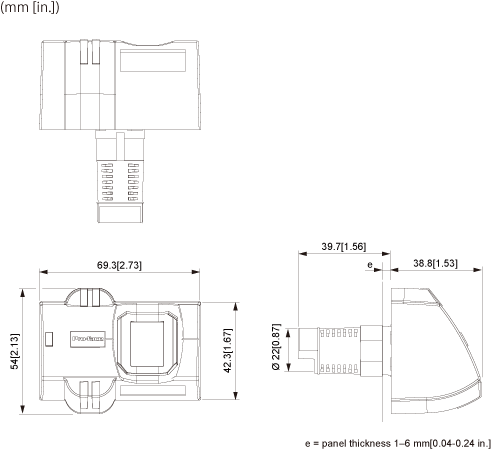
W69.3 x H54 x D78.5 mm (W2.73 x H2.13 x D3.09 in.)
Structure
NEMA #250/UL50 TYPE 12
(on the front panel when properly installed in an enclosure)
Cable Length
USB cable: 1.0 m (3.28 ft.)
Power cable: 2.0 m (6.56 ft.)
Weight
140g [0.31 lb]
Note: Design the USB cable to be 3 m or less when it is extended.
Dimensions
EZ Numpad
General Specifications
Model
PFXZCCEUKB1
Supported Standards and Regulations
Supported Software
GP-Pro EX Ver. 3.6 or later
Electrical Specifications
Power Supply
Rated Input Voltage
5 Vdc (Powered from USB bus)
Input Voltage Limits
4.75 to 5.25 Vdc
Power Consumption
0.75 W or less
Environmental Specifications
Physical Environment
Surrounding Air Operating Temperature
0 to 55 ℃ (32 to 131 ℉)
Storage Temperature
-20 to 60 ℃ (-4 to 140 ℉)
Surrounding Air and Storage Humidity
10 to 90% RH (Non-condensing, wet bulb temperature 39 ℃ [102.2 ℉] or less)
Dust
0.1 mg/m3 (10-7 oz/ft3) or less (nonconductive levels)
Pollution Degree
For use in Pollution Degree 2 environment
Corrosive Gasses
Free of corrosive gas
Operating Altitude
2,000m [6,561 ft] or lower
Mechanical Environment
Vibration Resistance
IEC/EN 61131-2 compliant
5 to 9 Hz Single amplitude 3.5 mm (0.14 in.)
9 to 150 Hz Fixed acceleration: 9.8 m/s2
X, Y, Z directions for 10 cycles (100 min.)
Concussion Resistance
IEC/EN 61131-2 compliant
(147 m/s2, X, Y, Z directions for 3 times)
Electrical Environment
Electrostatic Fast Transient Burst
IEC61000-4-4
2 kV Power Port (Display Unit)
1 kV Signal Ports
Electrostatic Discharge Immunity
IEC61000-4-2
6 kV Contact Discharge
8 kV Air Discharge
External Specifications
Connector Type
Type miniB (socket), USB 2.0 Full Speed
External Dimensions
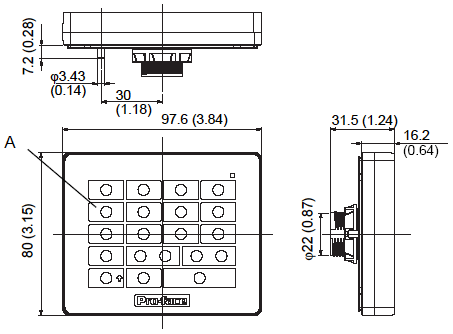
W97.6 x H80.0 x D31.5 mm (W3.84 x H3.15 x D1.24 in.)
Structure *1
IP65 UL50E TYPE 4X (Indoor Use Only)
(on the front panel when properly installed in an enclosure)
Weight
150 g (0.33 lb) or less
*1 The front face of the unit, installed in a solid panel, has been tested using conditions equivalent to the standards shown in the specification. Even though the unit’s level of resistance is equivalent to the UL50E TYPE 4X, oils that should have no effect on the unit can possibly harm the panel. This can occur in areas where either vaporized oils are present, or where low viscosity cutting oils are allowed to adhere to the panel for long periods of time. If the unit’s front face protection sheet peels off, these conditions can lead to the ingress of oil into the unit and separate protection measures are suggested.
Also, if non-approved oils are present, they may cause deformation or corrosion of the front panel’s plastic cover. Therefore, prior to installing the unit, be sure to confirm the type of conditions that will be present in the unit’s operating environment. If the installation gasket is used for a long period of time, or if the unit and its gasket are removed from the panel, the original level of protection cannot be kept. To maintain the original protection level, the periodical maintenance is essential.
Note:
A gasket with scratches or dirt could have lost much of its water resistance. The periodical maintenance is essential (e.g. once a year, or as soon as scratches or dirt become visible) for water resistance equivalent to IP65.
Dimensions
mm (in.)
A. Num Key / Function Key
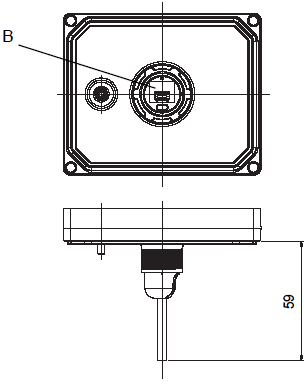
Dimensions with cable
mm (in.)
B. USB (Type miniB) Interface
EZ Illuminated Switch
General Specifications
Model
PFXZCCEUSG1
Supported Standards and Regulations
Supported Software
GP-Pro EX Ver. 3.1 or later
Functional Specifications
Number of Switches
5 illuminated switches
Durability of Switches
1 million times or more for each switch
LED Colors
Red, Green, Yellow, Blue, White, Orange
Insert Label
Printable and replaceable insert labels
Electrical Specifications
Power Supply *1
Rated Input Voltage
5 Vdc (Powered from USB bus)
Input Voltage Limits
4.75 to 5.25 Vdc
Power Consumption *2
2.0 W or less
*1 When you connect with GP4000M Series, please connect via self power USB Hub.
*2 If connecting to a display unit that has a USB I/F with an output current of less than 500 mA, be sure to supply power from an external source (such as a self-powered hub) to EZ Illuminated Switch because the display unit cannot supply enough power.
Environmental Specifications
Physical Environment
Surrounding Air Operating Temperature
0 to 55 ℃ (32 to 131 ℉)
Storage Temperature
-20 to 60 ℃ (-4 to 140 ℉)
Surrounding Air and Storage Humidity
10 to 90% RH (Non-condensing, wet bulb temperature 39 ℃ [102.2 ℉] or less)
Dust
0.1 mg/m3 (10-7 oz/ft3) or less (nonconductive levels)
Pollution Degree
For use in Pollution Degree 2 environment
Corrosive Gasses
Free of corrosive gas
Operating Altitude
2,000m [6,561 ft] or lower
Mechanical Environment
Vibration Resistance
IEC/EN 61131-2 compliant
5 to 9 Hz Single amplitude 3.5 mm (0.14 in.)
9 to 150 Hz Fixed acceleration: 9.8 m/s2
X, Y, Z directions for 10 cycles (100 min.)
Concussion Resistance
IEC/EN 61131-2 compliant
(147 m/s2, X, Y, Z directions for 3 times)
Electrical Environment
Electrostatic Fast Transient Burst
IEC61000-4-4
2 kV Power Port (Display Unit)
1 kV Signal Ports
Electrostatic Discharge Immunity
IEC/EN61000-4-2
6 kV Contact Discharge
8 kV Air Discharge
External Specifications
Connector Type
USB I/F: Type B (socket), USB 2.0 Full Speed
USB Cable Length
1m (Removable)
External Dimensions
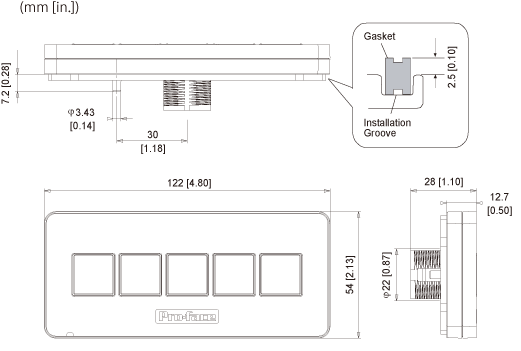
W122 x H54 x D28 mm (W4.80 x H2.13 x D1.10 in.)
Structure *3
IP65 NEMA #250 TYPE 4X/13
(on the front panel when properly installed in an enclosure)
Weight
110 g (0.24 lb) or less
*3 The front face of the unit, installed in a solid panel, has been tested using conditions equivalent to the standards shown in the specification. Even though the unit's level of resistance is equivalent to these standards, oils that should have no effect on the unit can possibly harm the panel. This can occur in areas where either vaporized oils are present, or where low viscosity cutting oils are allowed to adhere to the panel for long periods of time. If the unit's front face protection sheet peels off, these conditions can lead to the ingress of oil into the unit and separate protection measures are suggested. Also, if non-approved oils are present, they may cause deformation or corrosion of the front panel's plastic cover. Therefore, prior to installing the unit, be sure to confirm the type of conditions that will be present in the unit's operating environment. If the installation gasket is used for a long period of time, or if the unit and its gasket are removed from the panel, the original level of protection cannot be kept. To maintain the original protection level, be sure to replace the installation gasket regularly.
Note:
The upper surface of the gasket should protrude approximately 2.5 mm (0.1 in.) from the groove. Check the gasket is inserted correctly before installing this unit to a panel.
A gasket with scratches or dirt could have lost much of its water resistance. It is recommended that the gasket should be changed periodically (e.g. once a year, or as soon as scratches or dirt become visible) for water resistance equivalent to IP65.
No screen design required! Image data for settings included
Select from one of three modes (direct/normal/combination) to suit application
EZ LAN Adapter Features
Network & segment existing facilities at low cost
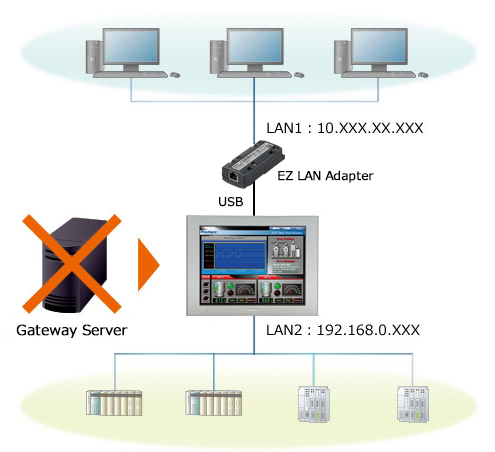
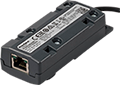
Adding the EZ LAN adapter allows an existing HMI to have two different IP addresses. Using the HMI as a gateway, the office and production networks of a factory can be physically segmented. Reduce costs for purchasing and installation of control network equipment.
Easily setup equipment modularly to suit your needs
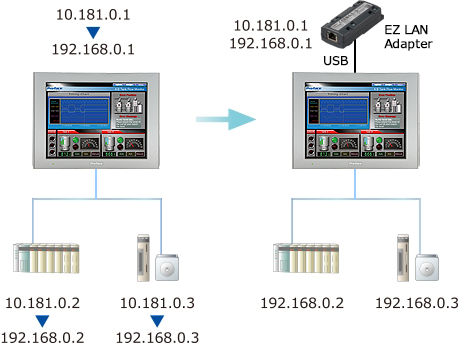
Easily connect equipment to office networks by adding the EZ LAN adapter. Simply add EZ LAN adapter and connect the device to the office network. By using the EZ LAN adapter for connecting to the office network, there is no need to change the IP address of each control equipment device. Networking can be accomplished with minimal installation effort.
EZ Illuminated Switch Features
Easy and flexible configuration of lamps and switches
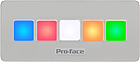
Lamps can be configured in six colors and 3 blink status in the screen editor software, GP-Pro EX.
Switches can be configured for bit, word, screen change, special feature and selector feature. EZ Illuminated Switch feature easily printable insert labels.
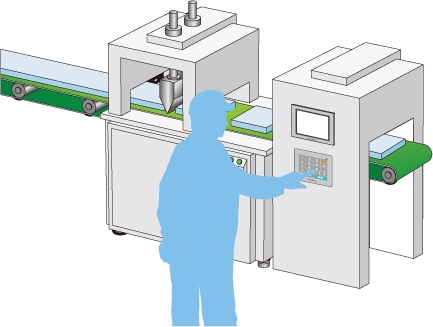
Configurable external switches for machine operability with tactile feedback
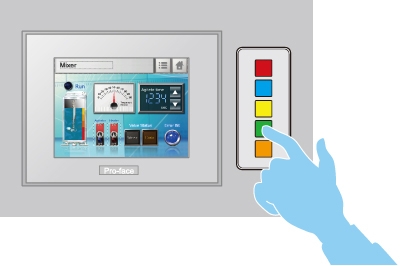
EZ Illuminated Switch allow operations where tactile feedback is desired. They are suitable for special operations like positioning and in situations when it is necessary to keep an eye on equipment when holding down a switch.
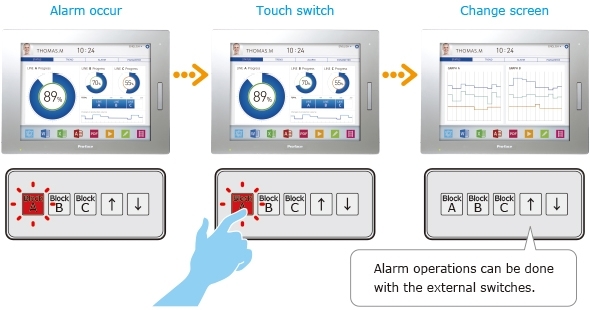
Indicate status of not displayed screens for each line or machine
EZ Illuminated Switch can be set to indicate alarm status with different colors according to current status. All alarm histories in the display unit can be checked and operated on one EZ Illuminated Switch. You can check alarm status even when operating another screen or when the display unit is in standby mode.
EZ Numpad Features
Configuring settings smoothly
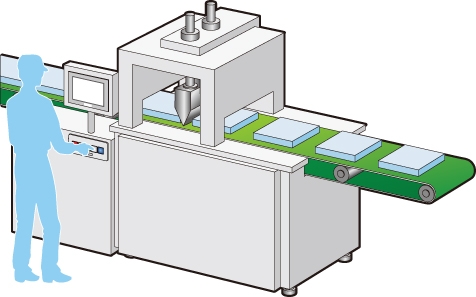
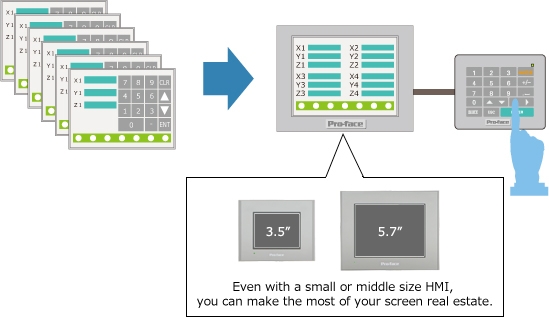
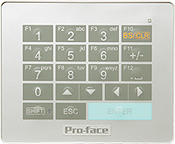
When settings need to be configured frequently, the increase in the number of cramped data entry screens to accommodate on-screen numeric keypads and the number of times the operator needs to switch between screens leads to reduced operability and misoperation. Using the EZ Numpad frees up screen real estate, leading to improved operability. This reduces the stress associated with frequent settings configuration.
Additional features:
Tactile feedback for trusty input operation.
Input numbers and letters even when wearing gloves.
Prevents deterioration of display caused by operation with dirty hands.
Reduced number of screens for setting configuration
On equipment that requires configuration of settings (such as recipe changes), it is necessary to create multiple setting configuration screens to ensure sufficient space for a digital numeric keypad. Using an EZ Numpad lets you leverage the full width of the display, reducing the number of man-hours required for screen design and improving legibility.
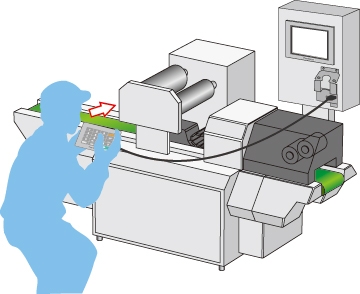
Easy data entry in a position away from the display
An EZ Numpad can be installed and used for settings and operation even in a remote location that is hard to see from the control panel. This feature is handy for simple adjustment when starting up the equipment or at changeover.
Additional features:
- Optional attachment for installing EZ Numpad on walls (model: PFXZCEATWM1).
- USB connection provides plug-and-play functionality, and allows keypad to be used only when needed.
- Keypad can be installed up to 5m (including the length of the USB cable in the equipment)away from display when using a commercially available USB cable.
Reduced need for redesigning if membrane keypads and microcomputers go out of production
Parts going out of production can cause problems if equipment employs membrane keypads and microcomputers. Discontinued parts result in a lot of work and time spent on tasks like redesigning, purchasing, and applying for standards certification. The reliable supply of Pro-face HMI and EZ Numpad eliminates worries about models going out of production. Additionally, connection and setup do not require programming, giving you more freedom to change specifications.
EZ Fingerprint Recognition Unit Features
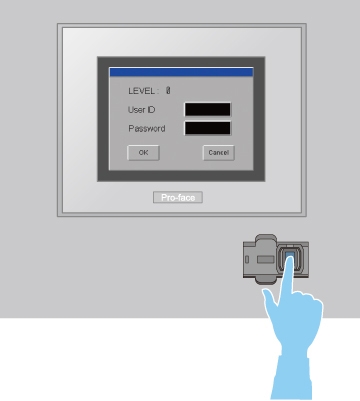
Fingerprint Authentification on HMI Operation
EZ Fingerprint Recognition Unit can be configured in 15-level password functions to reduce problems or accidents caused by inappropriate password use.
Fingerprint data is registered and maintained through an HMI or PC connected to EZ Fingerprint Recognition Unit.
*Fingerprint data for up to 100 users can be stored. *Fingerprint registration software for PC is coming soon on GP-Pro EX Ver. 3.1 package or from download. *You can register or delete fingerprint data by PC or HMI. The registration by PC is done on Fingerprint Recognition Setting Tool, which is included in GP-Pro EX Ver. 3.1 package. The fingerprint data can be imported to different screen data to use in other GP.
SP5000
GP4000
GP4100 Color Model
GP4000M
LT4000M
WinGP
*1USB cable (A - mini B) to connect to a Pro-face's interface unit is not included. Please purchase our optional cable (Model No.:ZC9USCBMB1) or commercial product.
*2When connecting GP4000M Series and GP4100 Series (Color model), connect via a self-powered USB hub. The multiple units of EZ Series cannot be connected to GP4000 Series, GP4000M Series, GP4100 Series (Color model) and WinGP.
*3When using Open Box, install EX Towerlight driver from GP-Pro EX DVD-ROM.
*4Except GP4100 Series Monochrome Model
*5Except GP-4201TW, GP4000M Series, GP4100 Series and GP4000H Series
*6This product involves fingerprint technology. In some jurisdictions, this product may be subject to notification to and/or approval by relevant local regulatory authority. The jurisdictions which do not require such notification and/or approval as of December 1, 2012 ("Non-regulated Jurisdictions") are Japan, Korea, Taiwan, Thailand, Singapore, Australia, USA, Canada, Mexico, and Brazil.