SCIENCEGATE

  • Home
  • Products
  • Profile
  • About Us
    • Events
    • Career
  • Contacts
 

Contact Us (65) 6561 0488

EZ Series

 
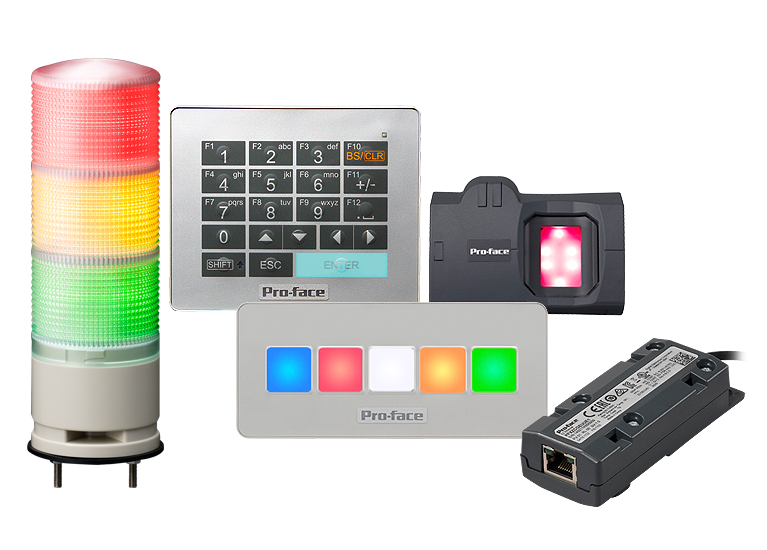
  EZ Tower Light EZ Illumination Switch EZ Numpad EZ Fingerprint Recognition  

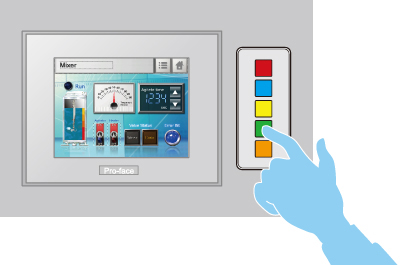
Easy and flexible configuration of lamps and switches

Lamps can be configured in six colors and 3 blink status in the screen editor software, GP-Pro EX.
Switches can be configured for bit, word, screen change, special feature and selector feature.*
EZ Illuminated Switch feature easily printable insert labels.
Illuminated Switches Feature
* For example: HOME, Change Screen, Change, Speed, Run, Stop, Reset, Auto, Manual and etc...
Page Top

Configurable external switches for machine operability with tactile feedback

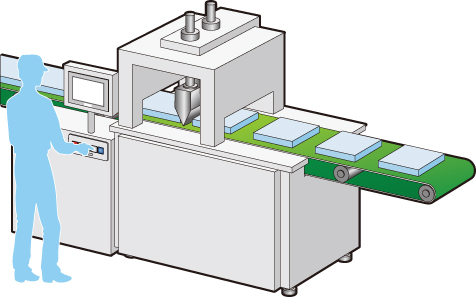
EZ Illuminated Switch allow operations where tactile feedback is desired. They are suitable for special operations like positioning and in situations when it is necessary to keep an eye on equipment when holding down a switch.
Illuminated Switches Feature
Page Top

Indicate status of not displayed screens for each line or machine

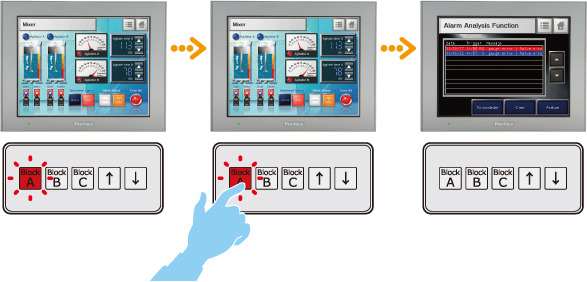
EZ Illuminated Switch can be set to indicate alarm status with different colors according to current status. All alarm histories in the HMI can be checked and operated on one EZ Illuminated Switch.
You can check alarm status even when operating another screen or when the HMI is in standby mode.
Illuminated Switch Feature
* Alarm operations can be done with the external switches.
Page Top


EZ Series

 
  EZ Tower Light EZ Illumination Switch EZ Numpad EZ Fingerprint Recognition  

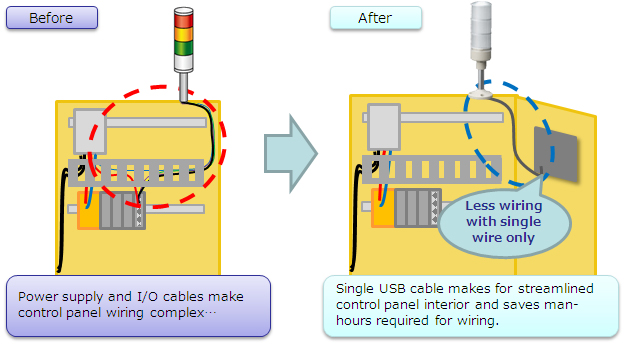
Streamlines Panel Interior

EZ Series
Page Top

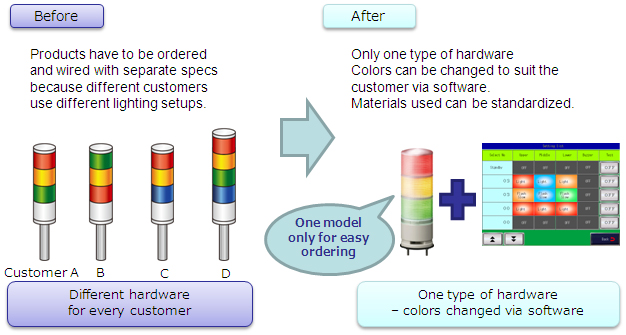
A single product for a wide range of customers

Tower Light Feature
Page Top

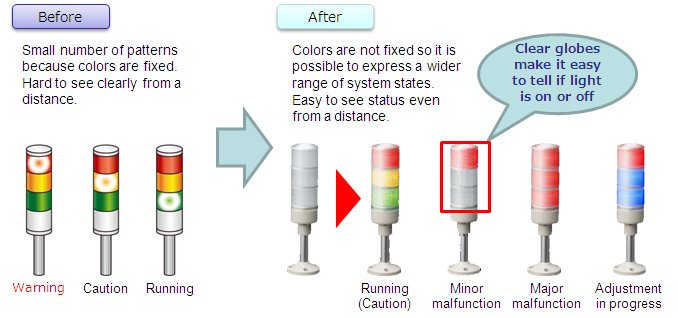
Make system status easier to understand

Tower Light Feature
Page Top

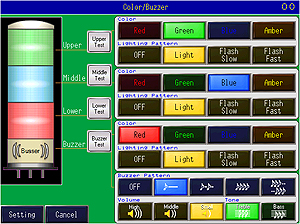
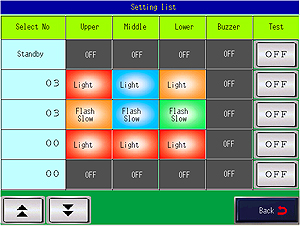
No screen design required! Image data for settings included

Select from one of three modes (direct/normal/combination) to suit application
Tower Light Feature          Tower Light Feature
Color and Buzzer Configuration Screen Settings List Screen


Specifications of GP4000 Series


EZ Series

Product Name Detailed Information
EZ Tower Light
tube mounting
with fixing plate
 *1 *2
(PFXZCETWHA1)


USB Connection Type Monolithic EZ Tower Light
tube mounting with fixing plate
→ Features
→ Specifications
EZ Tower Light
with base mounting
*1 *2
(PFXZCETWW1)


USB Connection Type Monolithic EZ Tower with base mounting
→ Features
→ Specifications
EZ Illuminated Switch
(PFXZCCEUSG1)


A unit of 5 illuminated switches with multiple color LED
easily connected with HMI via USB.
→ Features
→ Specifications
EZ Numpad
(PFXZCCEUKB1)


To enlarge an image

Equipped with alphanumeric keys and freely configurable function keys
(Configured via screen design software)
→ Features
→ Specifications
EZ Fingerprint Recognition Unit *3
(PFXZCCEUSS1)


Fingerprint recognition unit easily connected with HMI via USB.
→ Features
→ Specifications
  1. *1     USB cable (A-miniB) to connect to a Pro-face's interface unit is not included. Please purchase our optional cable (Model No.:ZC9USCBMB1) or commercial product.
  2. *2     When connecting GP4000M Series (color model), connect via a self-powered USB hub. The multiple units of EZ Series cannot be connected to GP4000 Series, GP4000M Series (color model) and WinGP.
  3. *3    This product involves fingerprint technology. In some jurisdictions, this product may be subject to notification to and/or approval by relevant local regulatory authority. The jurisdictions which do not require such notification and/or approval as of December 1, 2012 ("Non-regulated Jurisdictions") are Japan, Korea, Taiwan, Thailand, Singapore, Australia, USA, Canada, Mexico, and Brazil.


  • Series
  • Specifications
  • Features
  • Options
  • Downloads
 

EZ Series - Pro-face's USB Solutions

Easily connect to HMI with USB solutions

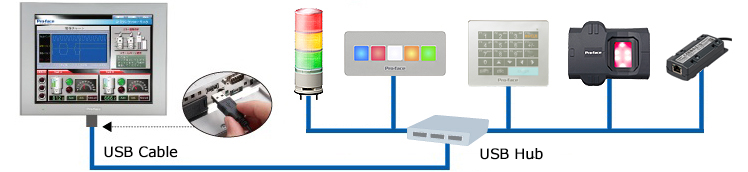
EZ Series is a USB device that can connect to HMI by a USB cable. The equipment around the operating panel can be installed with no program and less-wiring.
 

An important addition to our line-up, the "EZ LAN adapter" for HMI adds an extra LAN port with separate IP address to easily create your networked factory.

Cabling, Settings, Mounting, all is EZ

EZ cabling : connected with a USB cable.

Easily connect to HMI with a USB cable. Cabling labor time is reduced.

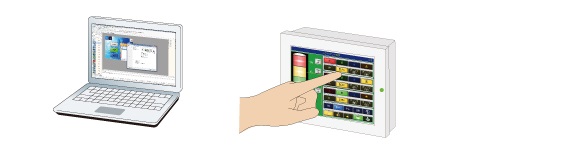
EZ settings : used without any programming

Settings can be configured on screen-creation software or HMI without any programming.

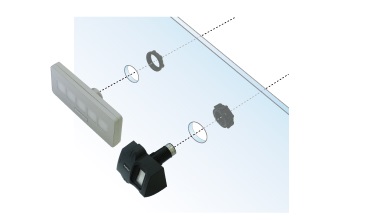
EZ mounting : mounting in a Φ22 mm circular hole

The circular hole makes additional mounting easy. *Except EZ Tower Light and EZ LAN Adapter


Product List
 
The applications that could run on SP5000 Series Open Box

 
The table below shows the applications that could run on SP5000 series Open Box.
Each availability mark is linked to its application's use environment information. For details, refer to it.
When you use an application shown in the table below, be sure to confirm operation of the application by yourself.
Please note that this information does not guarantee operation.
 
: Already used / Δ: Limited operation / -  : Not available

Category Applications Availability
PLC Siemens
STEP7
Δ
Rockwell
RSLogix 5000
Omron
CXOne, CX-Programmer
Mitsubishi
GX-Developer, GX-Works2
Yokogawa
WideField3
Fuji Electric
SX-Programmer Expert(D300win)
Fuji Electric
SX-Programmer Standard
Schneider Electric
Unity Pro XL
Toshiba Machine
TCPRGOS-W
KEYENCE
KV Studio V8
Integrated platform
(PLC + HMI + IO)
Schneider
SoMachine Basic
Database Pro-face
Pro-Server EX
Microsoft
SQL Sever
-
Motion/
Inverter/
Driver
Yaskawa
MPE720
Yaskawa
MA100
Yaskawa
Sigma Win+
IAI
RCM-101-MW/USB
(Robo Cylinder)
IAI
IA-101-MW/USB
(ASEL/PSEL/SSEL/XSEL/MSEL/TT)
Sanmei
CutyWave 3
Robot Yaskawa
Robot Controller
Software Pendant
Sentinel Driver
Δ
EPSON
EPSON RC+7.0
Δ
Vision Sensor Omron
TouchFinder for PC
Cognex
In-Sight Explorer
Δ
Cognex
VisionView
HMI software Pro-face
GP-Pro EX
CAD Viewer (3D) AutoDesk
DWG TrueView
-
VNC UltraVNC
Ultr@VNC Viewer (Client)
Microsoft Office Microsoft
Office 2007(Standard)
Microsoft
Office 2010
Microsoft
Office 2013
Browser Google
Chrome
Mozilla
Firefox
Security Software McAfee
McAfee Embedded Control
Remote Control Itbrain
TeamViewer
Others JT Engineering
JoyWatcher Suite
Δ
National Instruments
LabView
Δ


  1. Proface|SP5000|Connectable Devices
  2. Proface|SP5000|keynote movie
  3. Proface | SP5000 Series | Downloads
  4. Proface | SP5000 Series | Options

Page 120 of 128

  • 115
  • 116
  • 117
  • 118
  • 119
  • 120
  • 121
  • 122
  • 123
  • 124

Brands

  • BeanAir
  • Control Techniques
  • Delphin
  • Exemys
  • Flowline
  • Futek
  • Hakko
  • Kansai
  • KARI
  • LCM System
  • Micro Epsilon
  • MIRUS
  • Pavone
  • Proface
  • Solartron Metrology
  • STS
  • VALCOM

About Us

  • Events
  • Career
  • Download
  • Contacts
bizSAFE3
PGO9
 

SCIGATE AUTOMATION (S) PTE LTD @ 2025. ALL RIGHTS RESERVED.